

Released on September 30 this year, the new version of JUnit is now available and, although it is not as disruptive as version 5, it introduces interesting improvements and new features that are worth taking into account.
This new version arrives 8 years after the release of version 5, which we already discussed at the time in this article.
The first notable change is that the minimum Java version required is now Java 17, in line with the overall trend of the ecosystem. Versioning has also been unified. In version 5, the packages within org.junit.platform had version 1.x.x. In version 6, the same version applies to all JUnit packages, which greatly simplifies version management.
Nested test executions now have a deterministic order, as the annotations @TestClassOrder and @TestMethodOrder are recursively inherited by @Nested classes.
In addition, changes have been introduced in how tests configured with @ParameterizedTest and @ParameterizedClass are displayed. There is greater consistency in label rendering, and parameter names are now quoted by default—a behavior that can be controlled using the quoteTextArguments property. We can see this with a simple example:
    @ParameterizedTest
    @CsvSource(value = {
        "apple,         1",
        "banana,        2",
        "'lemon, lime', 0xF1",
        "strawberry,    700_000"
    })
    void test_With_Csv_Source(String fruit, int rank) {
        assertNotNull(fruit);
        assertNotEquals(0, rank);
    }
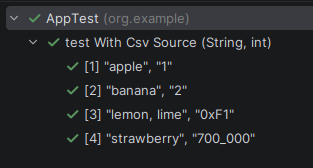
Another new feature is that the @CsvSource and @CsvFileSource annotations have been migrated to FastCSV, due to the discontinuation of maintenance of the univocity-parsers library, which had been used up to JUnit 5.
The string-to-object conversion call for factory constructors and method constructors now also supports CharSequence, in addition to String, which had already been supported since version 5.1. To illustrate this, we can set up the following example and see how it is able to directly convert any record, class, or even a class with a static builder, as long as it contains only a single attribute of type String or CharSequence:
    @ParameterizedTest
    @ValueSource(strings = "oak")
    void testStringToObjectConversionWithRecord(TreeType tree) {
        assertEquals("oak", tree.name());
    }

    public record TreeType(CharSequence name) {}
All JUnit modules now use JSpecify to indicate nullable parameters and return types. The Arguments interface used in parameterized tests is now officially a @FunctionalInterface. Finally, there is a new computeIfAbsent method for the ExtensionContext Namespace.
Deprecated features
JRE constants for versions prior to Java 17 have been deprecated. They no longer make sense now that Java 17 is the minimum version required to run JUnit.
JUnit Vintage is deprecated, and an INFO-level message will be shown if tests executed with this version are detected.
The junit-platform-runner module has been completely removed, and junit-jupiter-migrationsupport has been deprecated.
The junit-platform-jfr and junit-platform-suite-commons modules have been removed, and their respective functionality is now included in junit-platform-launcher and junit-platform-suite.
Support for Maven Surefire and Failsafe versions prior to 3.0.0 has been deprecated.
@CsvFileSource no longer includes the lineSeparator attribute. Line endings are now automatically detected among \r, \n, or \r\n.
To help prevent malformed input, extra characters after quotes are no longer allowed in @CsvSource and @CsvFileSource.
Conclusions
The new version, together with the decision to move to Java 17 and deprecate JUnit Vintage, provides the final push to upgrade our legacy tests to newer versions. Keeping code up to date is always important, as it allows us to take advantage of new features, performance improvements, and—no less important—security enhancements.
If you still have questions, you can always refer to the official user guide.
References

Diego López
I hold a Technical Engineering degree in Management Informatics from UAH. I've been part of Paradigma Digital since the summer of 2020 (right in the middle of the pandemic). I'm a fan of outdoor sports and nature, and I also enjoy tinkering and building small IoT projects.
View more of Diego.More thoughts about this.
Read more.
Java 8: How to Implement a Collector.

Extreme Cache Performance with Caffeine.

Resilience4j: Designing Fault-Resilient Java Microservices.

How to Make the Leap to RxJava (and Not Die Trying).

Comments are moderated and will only be visible if they add to the discussion in a constructive way. If you disagree with a point, please, be polite.

Tell us what you think.