

In this fourth installment of the series on running LLMs locally, we take a look at how to run them with Llamafile, an alternative tool to Ollama and LM Studio. We’ll explore how it works and a step-by-step guide to its implementation.
Want to catch up on the previous posts in the series?
- Running LLMs locally: getting started with Ollama
- Running LLMs locally: advanced Ollama
- Running LLMs locally: LM Studio
What is Llamafile?
Llamafile is a tool that turns LLMs into a single executable file, bundling the model weights together with a special version of the llama.cpp library. This file can be run on most computers without installing additional dependencies, and it also includes an inference server that exposes an API to interact with the model. All of this is made possible by combining the llama.cpp library with the Cosmopolitan Libc project (which allows C programs to be compiled and executed across a wide range of platforms and architectures).
Some example model llamafiles you can find are:
| Model | Size | License | Llamafile |
|---|---|---|---|
| LLaMA 3.2 1B Instruct Q4_K_M | 1.12 GB | LLAMA 3.2 | Mozilla/Llama-3.2-1B-Instruct-Q4_K_M-llamafile |
| Gemma 3 1B Instruct Q4_K_M | 1.11 GB | Gemma 3 | Mozilla/gemma-3-1b-it-Q4_K_M-llamafile |
| Mistral-7B-Instruct v0.3 Q2_K | 3.03 GB | Apache 2.0 | Mozilla/Mistral-7B-Instruct-v0.3-Q2_K-llamafile |
*Click on each “license” and “llamafile” cell to view the links.
You can find more llamafiles here and here.
Supported platforms
Thanks to the execution versatility provided by the Cosmopolitan Libc project, Llamafile can currently run on the following platforms:
- Operating systems:
- Linux 2.6.18+.
- Darwin (macOS) 23.1.0+. GPU support only for ARM64 (supported on paper, but not thoroughly tested).
- Windows 10+ (AMD64 only). The llamafile runs as a
.exefile. - FreeBSD 13+.
- NetBSD 9.2+ (AMD64 only).
- OpenBSD 7+ (AMD64 only).
- CPUs:
- AMD64: processors must support AVX. This means Intel CPUs must be Intel Core or newer (2006 onward), and AMD CPUs must be K8 or newer (2003 onward).
- ARM64: processors must support ARMv8a+. This allows execution on both Apple Silicon and 64-bit Raspberry Pi devices.
- GPUs:
- Apple Metal.
- NVIDIA.
- AMD.
For GPUs, additional configuration may be required, such as installing the NVIDIA CUDA SDK or the AMD ROCm HIP SDK. If GPUs are not detected correctly, Llamafile will default to using the CPU.
Execution
In this article, we will run llamafiles on the Ubuntu operating system. To do so, follow these steps to activate a model’s llamafile:
- Download the model’s llamafile. For example, Mozilla/Llama-3.2-1B-Instruct-llamafile.
- Grant execution permissions to the downloaded file using the following command:
chmod +x Llama-3.2-1B-Instruct-Q4_K_M.llamafile
- Run the file with the command:
./Llama-3.2-1B-Instruct-Q4_K_M.llamafile
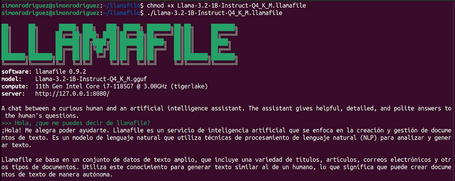
- When you finish interacting with the model, simply press Control+C.
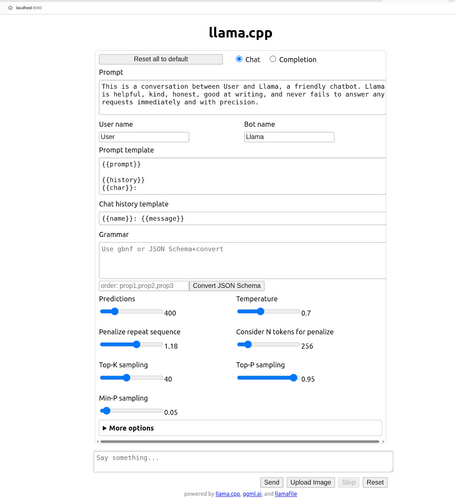
In addition, the llamafile itself provides a chat-style user interface to interact with the model (http://localhost:8080).
API
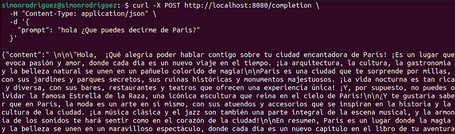
Although direct execution allows us to interact with the models, since we are reviewing these tools from a development team perspective, we also need an API to integrate them into applications. Llamafile exposes, among others, the following endpoints:
- /health (GET): shows the current status of the server.

- /completion (POST): returns the model’s response to user input.
- /tokenize (POST): tokenizes a text.
![simonrodriguez@simonrodriguez:~$ curl -X POST https://www.paradigmadigital.com/tokenize \ -H "Content-Type: application/json" \ -d '{ "content": "Hello, what can you tell me about Paris?" }' {"tokens":[71,8083,29386,26860,60045,50018,2727,409,12366,30]}](https://www.paradigmadigital.com/assets/img/resize/small/llamafile_tokenize_post_bed7a7a817.png "/tokenize")
- /detokenize (POST): converts tokens back into text.
![simonrodriguez@simonrodriguez:~$ curl -X POST https://www.paradigmadigital.com/detokenize \ -H "Content-Type: application/json" \ -d '{ "tokens": [71,8083,29386,26860,60045,50018,2727,409,12366,30] }' {"content":"Hello, what can you tell me about Paris?"}](https://www.paradigmadigital.com/assets/img/resize/small/llamafile_detokenize_post_f9846e3a19.png "/detokenize")
- /v1/chat/completions (POST): sends a chat interaction and returns the assistant’s response. OpenAI-compatible endpoint.
![simonrodriguez@simonrodriguez:~$ curl -X POST https://www.paradigmadigital.com/v1/chat/completions \ -H "Content-Type: application/json" \ -d '{ "messages": [{ "role": "user", "content": "What can you tell me about Paris?" }] }'](https://www.paradigmadigital.com/assets/img/resize/small/llamafile_v1_chat_completions_df2f8acf82.png "/v1/chat/completions")
At this link you can review all available parameters for the different endpoints.
Integration with previously downloaded models
As with Ollama and LM Studio, Llamafile can also work with external models as long as they are stored in GGUF format. While this is generally true, in some cases it may be necessary to make certain adjustments depending on the application used to download those models.
To run GGUF files, it is necessary to compile Llamafile on your machine. Installing Llamafile involves the following steps (in this case, on Ubuntu):
- Download the source code from the Git repository.
- In the directory where the code was downloaded, run the following commands (you may need to install updated versions of make, wget, and unzip):
make -j8
sudo make install PREFIX=/usr/local
Once llamafile is installed on the system, you can run models from GGUF files that may have been previously downloaded from other applications such as LM Studio or Ollama.
LM Studio
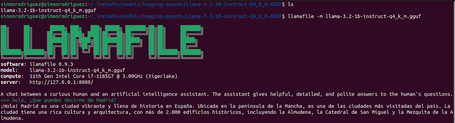
With LM Studio models usually stored in ~/.cache/lm-studio/models or ~/.lm-studio/models, you can run llamafile simply with the following command:
llamafile -m llama-3.2-1b-instruct-q4_k_m.gguf
Ollama
When a model is downloaded in Ollama, its metadata is stored in a file (manifest) in the corresponding directory, usually under ~/.ollama/models/manifests/registry.ollama.ai/library/.
If we open this file, we can see the properties in JSON format. Inside layers, the digest property (whose mediaType value ends with .model) is the one we need to focus on.
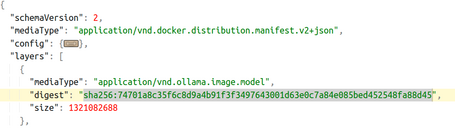
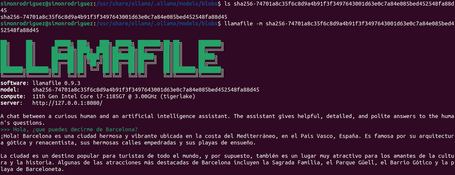
This digest value is used as the file name in the blobs directory (~/.ollama/models/blobs). It is this file from the blobs folder that can be used to run llamafile for the corresponding model. An example execution would be:
llamafile -m sha256-74701a8c35f6c8d9a4b91f3f3497643001d63e0c7a84e085bed452548fa88d45
Conclusions
In this post, we’ve explored another alternative to Ollama and LM Studio: Llamafile. This tool follows a slightly different approach, where each model is executed through a separate executable, with the advantage that no additional software installation is required.
In the next post, we’ll revisit an old acquaintance from the development world that is also joining the trend of running LLMs locally. I’ll see you in the comments!
References

Simón Rodríguez
Passionate about science and technology, to which I dedicate a large part of my life, both professionally and personally. Closely connected to backend software development, cloud, and DevOps, but always open to exploring any other existing or future technological fields. Continuously learning about everything around me—technology, people, nature—in order to contribute my small part to this world.
View more of Simón.More thoughts about this.
Read more.
Running LLMs Locally: LM Studio.
Running LLMs Locally: Getting Started with Ollama.
Deep Learning about Spring AI: MCP Implementation.

Deep Learning about Spring AI: Getting Strarted.

Comments are moderated and will only be visible if they add to the discussion in a constructive way. If you disagree with a point, please, be polite.

Tell us what you think.