

In this final chapter of the Spring AI series, we’ll explore the key terms to understand when working with MCP, and provide a high-level overview of the MCP architecture. Finally, we’ll explain how to build applications that use MCP on both the client and server sides with Spring AI.
As a reminder, in case you missed any of the previous articles, you can check out the rest of the Spring AI series at the following links:
- Deep Learning about Spring AI: Getting Strarted
- Deep Learning on Spring AI: multimodularity, prompts and observability
- Deep Learning on Spring AI: Advisors, Structured Output and Tool Calling
- Deep Learning about Spring AI: RAG, Embeddings and Vector Databases
- Deep Learning about Spring AI: ETL and MCP
MCP Foundations
MCP is based on a client-server architecture where an application can connect to multiple servers. Within this architecture, we can identify the following components:
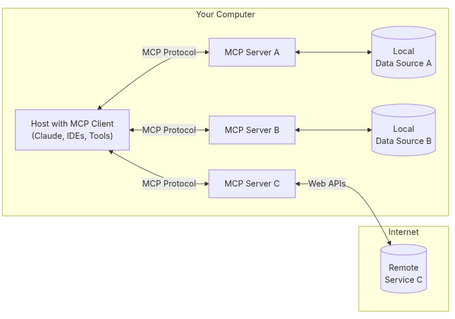
- Programs (hosts): programs, IDEs or AI tools that want to access data through MCP.
- Clients: MCP protocol clients that have 1:1 connections to servers.
- Servers: lightweight programs that expose functionality via MCP.
- Local data sources: file systems, databases, services, etc.
- Remote services: services available on the internet, e.g. via APIs.
Some of the key concepts used in this protocol are:
- Resources: a core concept that allows servers to expose data. Some examples of data:
- Files
- Database records
- API responses
- Images
- Logs
- Prompts: using prompt templates, servers offer a way to interact with LLMs.
- Tools: allow servers to expose functionalities to clients for interaction with other systems.
- Sampling: a mechanism that lets servers request LLM execution via the client. For example, in a chatbot scenario when the conversation mentions “API integration,” the MCP could lower the temperature to reduce randomness and generate more accurate answers.
- Roots: define the boundaries in which servers can operate (file paths, endpoints, folders, etc). For instance, a file system server will be limited to predefined folders.
- Transports: the underlying communication layer between clients and servers.
Java and Spring
There is an SDK for Java (as well as for Python, Kotlin, Typescript, C#) that implements MCP, extended by the Spring AI MCP module, integrating Spring Boot to provide client and server starters.
The Java implementation is based on the following layered architecture:
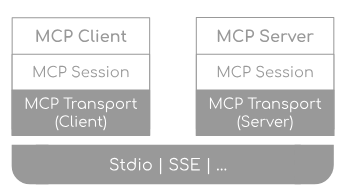
Each layer manages different responsibilities:
- Client/server layer: manages operations specific to each side:
- Some client operations:
- Negotiate with servers for compatibility.
- Diagnose available features.
- Discover and execute tools.
- Access and manage resources.
- Interact with prompts.
- Some server operations:
- Negotiate with clients and handle concurrent connections.
- Expose tools.
- Provide and manage prompts.
- Handle resources.
- Log and notify events.
- Session layer: manages communication patterns and state.
- Transport layer: handles JSON-RPC message serialization/deserialization across multiple transport implementations (stdio, SSE, or custom).
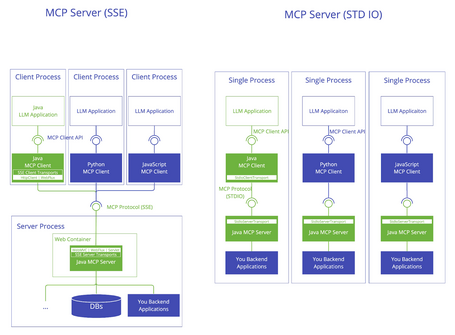
MCP Client
The MCP client starter provided by Spring AI offers autoconfiguration to create an MCP client within a Spring Boot application. It also supports both synchronous and asynchronous implementations with multiple transport options. The starter provides:
- Management of multiple client instances.
- Automatic initialization.
- Support for different transports.
- Integration with Spring AI's tool execution.
- Lifecycle management with automatic resource cleanup on context close.
- Customization of client creation.
Starters
The standard starter connects to one or more MCP servers simultaneously using stdio and/or SSE transports (SSE uses the HttpClient transport implementation). Each connection to an MCP server creates a new MCP client instance, and you can choose either synchronous or asynchronous clients — but not both types simultaneously.
<dependency>
    <groupId>org.springframework.ai</groupId>
    <artifactId>spring-ai-starter-mcp-client</artifactId>
</dependency>
The WebFlux starter provides similar functionality to the standard starter but uses a WebFlux-based implementation for SSE.
<dependency>
    <groupId>org.springframework.ai</groupId>
    <artifactId>spring-ai-starter-mcp-client-webflux</artifactId>
</dependency>
Properties
Properties are divided into common, stdio, and SSE. Some relevant properties include:
- Common: should be prefixed with spring.ai.mcp.client:
| Property | Description | Default |
|---|---|---|
| request-timeout | Timeout for client requests | 20s |
| type | Server type (SYNC/ASYNC). All clients must be of a single type: sync or async | SYNC |
| root-change-notification | Enable root change notifications for all clients | true |
| toolcallback.enabled | Enable MCP tool callback integration with Spring AI tool execution | true |
- stdio: must be set with the prefix spring.ai.mcp.client.stdio:
| Property | Description | Default |
|---|---|---|
| servers-configuration | Resource containing the configuration of the MCP servers in JSON format | - |
| connections | Map with the different configurations by connection name for stdio | - |
| connections.[name].command | Command to run the MCP server | - |
| connections.[name].args | List of command arguments | - |
| connections.[name].env | Map of environment variables for the server process | - |
If you configure the servers-configuration property, you must provide the path to the file containing the configuration in Claude Desktop format (this format currently only supports configuring stdio connections). An example of the file format is:
{
  "mcpServers": {
    "filesystem": {
      "command": "docker",
      "args": [
        "run",
        "-i",
        "--rm",
        "--mount", "type=bind,src=/home/user/test,dst=/projects/test",
        "mcp/filesystem",
        "/projects/test"
      ]
    }
  }
}
- SSE: must be set with the prefix spring.ai.mcp.client.sse:
| Property | Description | Default |
|---|---|---|
| connections | Map with different configurations by connection name for SSE | - |
| connections.[name].url | Base URL for SSE communication with the MCP server | - |
| connections.[name].sse-endpoint | SSE endpoint to use for the connection | /sse |
Features
As mentioned, the starter supports two types of clients:
- Synchronous (default client type): suitable for traditional applications with blocking operations.
- Asynchronous: suitable for reactive applications with non-blocking operations, and enabled by the property spring.ai.mcp.client.type=ASYNC.
In addition, the starter's autoconfiguration allows for customization of various client aspects such as timeouts, event handling, or message processing. These customizations can be configured by implementing the McpSyncClientCustomizer and McpAsyncClientCustomizer classes. Some available customizations include:
- Requests: timeout configuration.
- Sampling handlers: configuration of how servers request samples (sampling) from the LLM. This allows clients to control access to the models.
- Filesystem access (roots): configuration of how clients expose filesystem “roots” to servers. “Roots” define the boundaries servers have when operating on the filesystem — in other words, which files and folders they can access. Servers can request the list of “roots” and receive notifications when this list changes.
@Component
public class CustomMcpSyncClient implements McpSyncClientCustomizer {

    @Override
    public void customize(String serverConfigurationName, McpClient.SyncSpec spec) {
      RootCapabilities rootCapabilities = new RootCapabilities(true);
      spec.capabilities(new ClientCapabilities(null, rootCapabilities, null));
      // Sets the root URIs that this client can access.
      spec.roots(Arrays.asList(new Root(System.getProperty("user.home") + "/out", "Out foler")));
    }
}
- Event handlers: handlers that are notified when the server emits an event. These events stem from changes in the list of functions (tools), resources, or prompts.
- Log handlers: configuration of how servers send log messages to clients. Clients can control verbosity by configuring log levels.
Several transport types are supported:
- Standard I/O (Stdio): enabled via spring-ai-starter-mcp-client.
- HTTP SSE: enabled via spring-ai-starter-mcp-client.
- WebFlux SSE: enabled via spring-ai-starter-mcp-client-webflux.
Integration with the Spring AI “tool-calling” execution cycle is also possible (Tool-Calling in Spring AI), which must be enabled via the property spring.ai.mcp.client.toolcallback.enabled=true.
MCP Server
The MCP server starter provided by Spring AI offers autoconfiguration to create an MCP server in Spring Boot applications. The starter provides:
- Automatic configuration for MCP server components.
- Support for both synchronous and asynchronous modes.
- Multiple transport layer options.
- Flexibility in defining functions (tools), resources, and prompts.
- Change notifications.
Starters
A starter must be selected based on the transport layer requirements:
- Standard: supports STDIO transport, suitable for desktop or command-line tools.
<dependency>
    <groupId>org.springframework.ai</groupId>
    <artifactId>spring-ai-mcp-server-spring-boot-starter</artifactId>
</dependency>
The starter activates the McpServerAutoConfiguration class, providing:
- Configuration of the server's core components
- Handling of specifications for functions (tools), resources, and prompts
- Management of server capabilities and change notifications
- Synchronous and asynchronous implementations
- WebMVC: supports SSE transport based on Spring MVC and optionally STDIO transport.
<dependency>
    <groupId>org.springframework.ai</groupId>
    <artifactId>spring-ai-starter-mcp-server-webmvc</artifactId>
</dependency>
The starter activates the McpWebMvcServerAutoConfiguration and McpServerAutoConfiguration classes, providing:
- HTTP transport using Spring MVC
- Automatic configuration of SSE endpoints
- STDIO transport enabled via the property spring.ai.mcp.server.stdio=true
- WebFlux: supports SSE transport based on Spring WebFlux and, optionally, STDIO transport.
<dependency>
    <groupId>org.springframework.ai</groupId>
    <artifactId>spring-ai-starter-mcp-server-webflux</artifactId>
</dependency>
The starter activates the McpWebFluxServerAutoConfiguration and McpServerAutoConfiguration classes, providing:
- Reactive transport using Spring WebFlux.
- Automatic configuration of SSE endpoints.
- STDIO transport enabled via the property spring.ai.mcp.server.stdio=true
Properties
Some of the important properties for configuration, which must be set with the spring.ai.mcp.server prefix, are:
| Property | Description | Default |
|---|---|---|
| stdio | Enable/disable stdio transport | false |
| type | Server type (SYNC/ASYNC) | SYNC |
| resource-change-notification | Enable notifications for resource changes | true |
| prompt-change-notification | Enable notifications for prompt changes | true |
| tool-change-notification | Enable notifications for tool changes | true |
Types
Servers can be either synchronous or asynchronous:
- Synchronous: the default type, implemented using McpSyncServer and designed for request-response patterns. It is enabled with the property spring.ai.mcp.server.type=SYNC.
- Asynchronous: implemented with McpAsyncServer and optimized for non-blocking operations. It is enabled with the property spring.ai.mcp.server.type=ASYNC.
Features
This starter, among other things, allows servers to expose functions, resources, and prompts to clients. It automatically converts the registered handler beans for these features into sync/async specifications based on the server type:
- Functions (Tools): for servers to expose functions that can be invoked by models. In this regard, the starter offers:
- Change notifications.
- Functions are automatically transformed into synchronous/asynchronous specifications based on the server type used.
- Specification via Spring beans.
@Bean
ToolCallbackProvider userToolProvider(UserTools userTools) {
   return
MethodToolCallbackProvider.builder().toolObjects(userTools).build();
}
- Resources: provides a way for servers to expose resources to clients:
- Static and dynamic resource specifications.
- Change notifications.
- Support for resource templates.
- Automatic transformation between synchronous and asynchronous specifications.
- Specification via Spring beans.
@Bean
List<McpServerFeatures.SyncResourceSpecification>
myResources(@Value("classpath:/static/trends.txt") Resource resource) {
    var systemInfoResource = new McpSchema.Resource("file://trends.txt", "Trends", "Fichero con 3 tendencias tecnologicas del año 2025", "text/plain", new Annotations(Arrays.asList(Role.USER), Double.valueOf("0")));
    var resourceSpecification = new
McpServerFeatures.SyncResourceSpecification(systemInfoResource, (exchange, request) -> {
      try {
         String jsonContent =
      resource.getContentAsString(StandardCharsets.UTF_8);
         return new McpSchema.ReadResourceResult(List.of(new
      McpSchema.TextResourceContents(request.uri(), "text/plain", jsonContent)));
      } catch (Exception e) {
         throw new RuntimeException("Failed to generate system info", e);
      }
   });
   return List.of(resourceSpecification);
}
- Prompts: the way servers present prompt templates:
- Change notifications.
- Template versioning.
- Automatic transformation between synchronous and asynchronous specifications.
- Specification via Spring beans.
@Bean
List<McpServerFeatures.SyncPromptSpecification> myPrompts() {
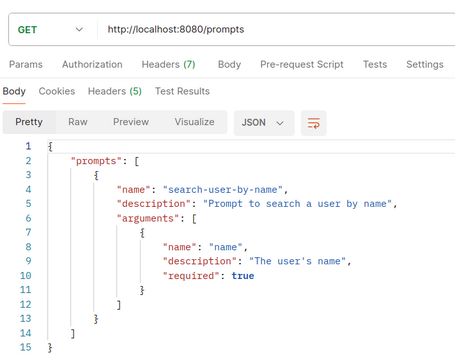
   var prompt = new McpSchema.Prompt("search-user-by-name", "Prompt to search a user by name", List.of(new McpSchema.PromptArgument("name", "The user's name", true)));

   var promptSpecification = new
McpServerFeatures.SyncPromptSpecification(prompt,
      (exchange, getPromptRequest) -> {
         String nameArgument = (String)
      getPromptRequest.arguments().get("name");
         if (nameArgument == null) {nameArgument = "friend";}
         var userMessage = new PromptMessage(Role.USER, new
      TextContent("Existe el usuario " + nameArgument + "?"));
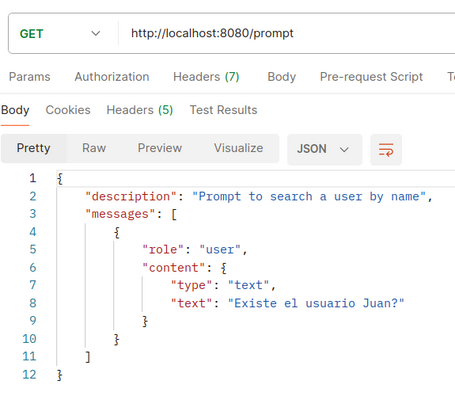
         return new GetPromptResult("Prompt to search a user by name", List.of(userMessage));
      });
      return List.of(promptSpecification);
}
- Roots: when a root changes, clients that support it (listChanged) send a notification. In this case, the server offers:
- Monitoring of root changes.
- Automatic transformation to asynchronous consumers for reactive applications.
- Optional registration via Spring beans.
@Bean
BiConsumer<McpSyncServerExchange, List<McpSchema.Root>> rootsChangeHandler(){
    return (exchange, roots) -> {
        log.info("Cambio en los roots recibido: {}", roots);
    };
}
In reference to the transport types, those provided by these starters are:
- Standard I/O (Stdio): enabled via spring-ai-starter-mcp-server.
- Spring MVC (SSE): enabled via spring-ai-starter-mcp-server-webmvc.
- Spring WebFlux (Reactive SSE): enabled via spring-ai-starter-mcp-server-webflux.
Demo
To verify how both starters work, we create two projects/applications, one for the client and one for the server:
- Client: through property configuration, we specify two servers:
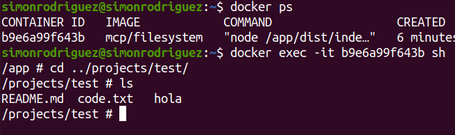
- Stdio: a server with functions over the file system (in this case the
/projects/testfolder inside the Docker container), executed via Docker. It’s necessary to correctly define the folder mapping between the host and the Docker container, as well as the folder the MCP server has permissions on. - SSE: a server created using Spring AI with a simple function to list users.
spring:
  ...
    mcp:
      client:
        toolcallback:
          enabled: true
        type: SYNC
        sse:
          connections:
            usuarios:
              url: http://localhost:8081
        stdio:
          connections:
            files:
              command: docker
              args:
                - 'run'
                - '-i'
                - '--rm'
                - '--mount'
                - 'type=bind,src=/home/user/test,dst=/projects/test'
                - 'mcp/filesystem'
                - '/projects/test'
- Server: provides a function (tool) to retrieve a list of users, and also exposes resources and prompts.
To run the endpoints, you must start the MCP server application first, followed by the MCP client application (the file system server starts automatically via Docker when the MCP client is launched).
In the app acting as MCP client, the following endpoints are exposed:
- list-files: endpoint that lists files from a directory within Docker, executed by the MCP server. The client provides context with the server's exposed information to the LLM so it can respond correctly.
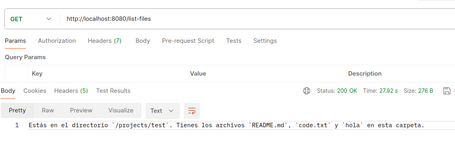
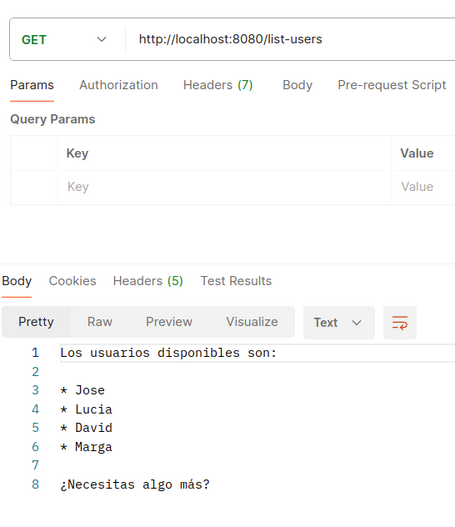
- list-users: endpoint that lists users exposed by the MCP server implemented with Spring AI. The client provides context with the server’s data to the LLM.
- tools: returns a list of functions offered by the MCP server implemented with Spring AI.
!["name": "listUsers", "description": "returns a list of users", "inputSchema": { "type": "object", "properties": 13, "required": [], "additionalProperties": false }](https://www.paradigmadigital.com/assets/img/resize/small/tool_list_79092a1268.png "Tool list")
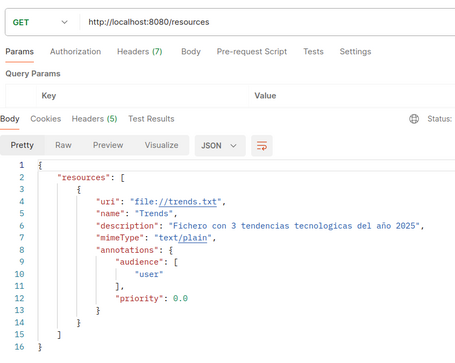
- resources: lists the resources exposed through the MCP server implemented with Spring AI.
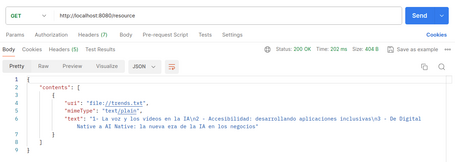
- resource: gets information from the resource (trends.txt) exposed by the MCP server implemented with Spring AI.
- prompts: list of available prompt templates on the MCP server implemented with Spring AI.
- prompt: retrieves a predefined prompt example for use with the MCP server implemented with Spring AI.
- add-root: endpoint that allows adding a new root to the client's list (if the root already exists, an error is thrown), notifying the server of the change in available roots. Since a root change consumer has been defined on the MCP server, the logs will show the available roots.

Example code for both client and server MCP is available at the provided links.
Conclusion
This concludes the final chapter in the Spring AI series. In this case, we’ve explored key MCP concepts as well as verified what functionality the MCP starters offer with an implementation example.
Throughout the Spring AI series, we’ve seen how to build not only traditional chat applications but also more complex apps with diverse workflows and tasks—leveraging LLMs to maintain a unified natural language interface.
Despite still being in its early versions, we can already see the power of the framework, while keeping in mind the capabilities of the LLMs we use to build AI-centered applications. It’s also important to note that the Spring team will likely continue adding new features to this module as LLMs evolve.
This is why it’s more important than ever to stay up to date with the latest developments so we don’t fall behind in this fast-paced technological era—AI is moving faster than ever. See you in the comments!
References

Simón Rodríguez
Passionate about science and technology, to which I dedicate a large part of my life, both professionally and personally. Closely connected to backend software development, cloud, and DevOps, but always open to exploring any other existing or future technological fields. Continuously learning about everything around me—technology, people, nature—in order to contribute my small part to this world.
View more of Simón.More thoughts about this.
Read more.
Deep Learning about Spring AI: Getting Strarted.

Deep Learning about Spring AI: ETL y MCP.

Deep Learning about Spring AI: RAG, Embeddings and Vector Databases.

Deep Learning about Spring AI: Advisors, Structured Output and Tool Calling.

Comments are moderated and will only be visible if they add to the discussion in a constructive way. If you disagree with a point, please, be polite.

Tell us what you think.