

Based on our experience in cloud environments, accessing object storage such as AWS S3 is typically solved in one of three ways: through direct API calls (AWS CLI), by mounting the bucket as a local filesystem using s3fs-fuse, or through Amazon’s new native client, AWS S3 Files.
In this article, we present an automated benchmark built with Terraform/OpenTofu to compare the real-world performance of these three approaches, measuring sequential read and write operations across different file sizes.
We analyze the IOPS, latency, and throughput of each method, concluding that there is no universally superior solution. Instead, the optimal choice depends on the characteristics of the workload.
Architecture
The test environment is fully defined as Terraform infrastructure-as-code and consists of the following components:
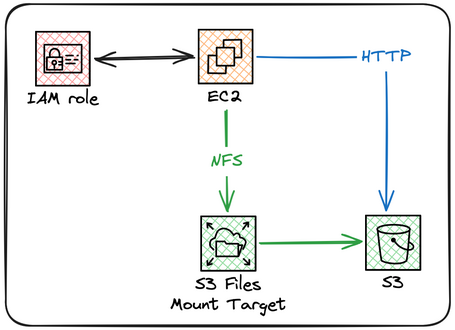
Each component serves a specific role:
- S3 Bucket — Object storage with versioning enabled, SSE-KMS encryption, and public access blocked.
- EC2 Instance — Executes the benchmark automatically at startup through user-data.
- IAM Role — Least-privilege policies: GetObject, PutObject, DeleteObject, ListBucket, and HeadObject on the test bucket.
- S3 Files Mount Target — NFS mount point within the VPC subnet that connects the EC2 instance to the S3 Files filesystem.
Methodology
The benchmark follows a structured design to ensure comparable results across all approaches.
Test Parameters
| Parameter | Value |
|---|---|
| Region | eu-south-2 (Spain) |
| Instance | t3.micro (2 vCPU, 1 GiB RAM) |
| OS | Amazon Linux 2023 |
| File Sizes | 1 KB, 100 KB, 1 MB, 10 MB, 100 MB |
| Files per Size | 10 |
| Generation Method | /dev/urandom (non-compressible data) |
Measured Operations
For AWS CLI, five sequential operations are measured:
- UPLOAD — Upload 10 files to the bucket.
- LIST — Recursively list the test directory.
- DOWNLOAD — Download the 10 files to local disk.
- HEAD / STAT — Retrieve metadata for each object.
- DELETE — Remove the 10 objects from the bucket.
For s3fs-fuse and S3 Files, benchmarks are performed using oai_citation:0‡github.com (v3.32) with direct I/O (libaio, direct=1), measuring:
- IOPS — Sustained I/O operations per second over 30 seconds.
- Throughput (MB/s) — Effective bandwidth.
- Latency (μs) — Average latency per operation.
The primary metric is the total execution time in milliseconds required to complete each operation (10 files) for the CLI approach, complemented by IOPS and throughput (MB/s) for the FUSE and S3 Files mounts.
Automation
The entire lifecycle—creating the bucket, launching the instance, installing dependencies, compiling s3fs-fuse from source, mounting S3 Files, executing the tests, and generating the results CSV—is orchestrated through a single script executed as user-data during instance startup.
The infrastructure is defined as code using Terraform with two reusable modules:
- modules/s3-bucket — Creates the bucket with the required security configurations.
- modules/ec2-benchmark — Deploys the instance, IAM Role, Security Group, and uploads the benchmark script to the bucket so the instance can download it at startup.
Components
AWS CLI (Native S3)
The native approach uses AWS CLI v2 (aws-cli/2.33.15), which internally performs calls to the S3 REST API. Each invocation of aws s3 cp involves:
- Starting a new Python/CLI process.
- Resolving credentials from the instance profile metadata service.
- Establishing an HTTPS connection to the S3 endpoint.
- Authenticating using SigV4 signing.
- Transferring content (multipart upload for files larger than 8 MB).
- Closing and cleaning up the process.
# UPLOAD — a single file
aws s3 cp "test_10MB_1.dat" "s3://my-bucket/native/test_10MB_1.dat" --no-progress

# LIST — recursive listing
aws s3 ls "s3://my-bucket/native/" --recursive

# HEAD — object metadata
aws s3api head-object --bucket "my-bucket" --key "native/test_10MB_1.dat"
For UPLOAD and DOWNLOAD operations, the benchmark iterates sequentially over the 10 files while measuring the total execution time of the entire block.
s3fs-fuse
s3fs-fuse (v1.97, compiled from source from oai_citation:1‡github.com) mounts an S3 bucket as a oai_citation:2‡en.wikipedia.org (Filesystem in Userspace), allowing objects to be accessed using standard POSIX operations such as cp, ls, stat, and rm.
# Build from source (Amazon Linux 2023)
dnf install -y fuse fuse3 fuse3-devel fuse-devel libcurl-devel \
libxml2-devel gcc-c++ make openssl-devel autoconf automake libtool git

cd /tmp && git clone https://github.com/s3fs-fuse/s3fs-fuse.git
cd s3fs-fuse && ./autogen.sh && ./configure
make -j$(nproc) && make install && ldconfig

# Mount using temporary IAM Role credentials
eval $(aws configure export-credentials --format env)

s3fs "my-bucket" "/mnt/s3" \
-o access_key_id="$AWS_ACCESS_KEY_ID" \
-o secret_access_key="$AWS_SECRET_ACCESS_KEY" \
-o session_token="$AWS_SESSION_TOKEN" \
-o use_cache=/tmp \
-o use_path_request_style \
-o enable_noobj_cache \
-o sigv2
Note: s3fs-fuse is not available as a package for Amazon Linux 2023, so it must be compiled from source during instance initialization.
The mount options are critical for performance:
| Option | Purpose |
|---|---|
| use_cache=/tmp | Stores downloaded files in RAM (tmpfs), avoiding repeated downloads. |
| enable_noobj_cache | Caches object non-existence to reduce HeadObject calls. |
| use_path_request_style | Uses path-style URLs (/bucket/key) instead of virtual-hosted style. |
| sigv2 | Forces API Signature Version 2, reducing authentication overhead. |
Internally, s3fs-fuse translates each POSIX operation into the corresponding S3 API call. For example, copying a new file becomes a PUT Object request, while a stat operation maps to a HEAD Object request.
AWS S3 Files (mount.s3files)
AWS S3 Files is Amazon’s native service for mounting S3 buckets as filesystems, available through mount.s3files on Amazon Linux 2023. Unlike s3fs-fuse, S3 Files does not connect the EC2 instance directly to S3. The actual data path is as follows:
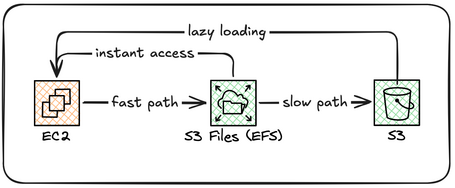
The EC2 instance mounts a filesystem via the NFS protocol from an EFS-backed mount target that acts as a high-performance cache. This cache serves local copies of files and synchronizes changes back to the S3 bucket.
# Installation (Amazon Linux 2023)
dnf install -y amazon-efs-utils

# Mounting — OpenTofu creates the File System and Mount Target in the VPC.
# The benchmark script mounts it using the File System ID:

mount_file_id=$(cat /root/benchmark-results/s3files_fs_id)
/usr/sbin/mount.s3files "${mount_file_id}" /root/s3files-mount

# Verify mount
mount | grep s3files

# Example output:
# fs-0bbbd1d66142be171 on /root/s3files-mount type s3files ...
Key characteristics of S3 Files:
| Characteristic | S3 Files | s3fs-fuse |
|---|---|---|
| Architecture | NFS Client → Mount Target (VPC) → File System → S3 | FUSE → HTTPS → S3 API |
| Protocol | NFSv4.1 / NFSv4.2 | FUSE (POSIX operations translated into S3 REST API calls) |
| Network Path | EC2 → Local VPC Mount Target → S3 (AWS-managed) | EC2 → Internet/VPC Endpoint → S3 REST API |
| Read Cache | EFS cache (Fast Path for files <128 KB) | Local RAM cache (use_cache=/tmp, tmpfs) |
| Consistency | Strong read-after-write by default | Eventual consistency with enable_noobj_cache |
| Credentials | Automatic IAM Role resolution via Mount Target | Manual injection of temporary credentials |
S3 Files is designed to provide strong consistency and simplified operations, but its performance characteristics can differ significantly from s3fs-fuse depending on the workload.
Environment Setup
The full deployment is executed with three commands:
# 1. Initialize OpenTofu
tofu init

# 2. Review the plan
tofu plan -var-file=terraform.tfvars

# 3. Deploy
tofu apply -var-file=terraform.tfvars

After apply, OpenTofu returns the instance's public IP.
The benchmark starts automatically in less than one minute:

Outputs:

instance_public_ip = "<EC2_PUBLIC_IP>"
results_location = "/root/benchmark-results/"
ssh_command = "ssh -i <ssh_key>.pem ec2-user@<EC2_PUBLIC_IP>"
Results are stored in /root/benchmark-results/ with the following files:
- results.csv — Raw benchmark data (
test_name,operation,file_size,bw_mbps,iops,lat_us). - fio_*.json — Detailed fio logs per method and file size (latency percentiles, I/O distribution).
- benchmark.log — Complete execution log.
- summary.txt — Configuration summary and commands for downloading results.
Results
The complete dataset is collected in CSV format. CLI results are measured as the total time required to perform 10 sequential operations, while s3fs-fuse and S3 Files results are measured using fio in sustained mode (30 seconds, direct I/O with libaio).
Sequential Read — IOPS
| Size | AWS CLI | s3fs-fuse | S3 Files | FUSE vs Files |
|---|---|---|---|---|
| 1 KB | 1 | 30,546 | 1,452 | 21.0x |
| 100 KB | 1 | 13,213 | 750 | 17.6x |
| 1 MB | 1 | 1,590 | 30 | 53.0x |
| 10 MB | 0 | 114 | 16 | 7.1x |
| 100 MB | 0 | 14 | 2 | 7.0x |
Sequential Read — Average Latency (μs)
| Size | AWS CLI | s3fs-fuse | S3 Files | FUSE vs Files |
|---|---|---|---|---|
| 1 KB | 738 | 34 | 686 | 0.05x |
| 100 KB | 745 | 75 | 1,389 | 0.05x |
| 1 MB | 785 | 503 | 33,580 | 0.02x |
| 10 MB | 735 | 8,761 | 67,888 | 0.13x |
| 100 MB | 729 | 71,089 | 493,593 | 0.14x |
Sequential Write — IOPS
| Size | s3fs-fuse | S3 Files | FUSE vs Files |
|---|---|---|---|
| 1 KB | 22,600 | 219 | 103.2x |
| 100 KB | 9,211 | 82 | 112.3x |
| 1 MB | 1,453 | 49 | 29.7x |
| 10 MB | 105 | 12 | 8.8x |
| 100 MB | 10 | 2 | 5.0x |
Sequential Write — Average Latency (μs)
| Size | s3fs-fuse | S3 Files | FUSE vs Files |
|---|---|---|---|
| 1 KB | 42 | 4,553 | 0.01x |
| 100 KB | 106 | 12,246 | 0.01x |
| 1 MB | 684 | 20,514 | 0.03x |
| 10 MB | 9,496 | 80,100 | 0.12x |
| 100 MB | 103,649 | 485,609 | 0.21x |
Read Throughput (MB/s)
| Size | s3fs-fuse | S3 Files | FUSE vs Files |
|---|---|---|---|
| 1 KB | 30.5 | 1.4 | 21.4x |
| 100 KB | 1,321 | 74 | 17.8x |
| 1 MB | 1,620 | 30 | 54.0x |
| 10 MB | 1,164 | 164 | 7.1x |
| 100 MB | 1,496 | 210 | 7.1x |
Write Throughput (MB/s)
| Size | s3fs-fuse | S3 Files | FUSE vs Files |
|---|---|---|---|
| 1 KB | 24.0 | 0.2 | 120x |
| 100 KB | 1,117 | 9 | 124x |
| 1 MB | 1,761 | 52 | 33.9x |
| 10 MB | 1,120 | 136 | 8.2x |
| 100 MB | 1,027 | 216 | 4.8x |
AWS CLI Operations — Total Times (ms, 10 files)
| Operation | 1 KB | 100 KB | 1 MB | 10 MB | 100 MB |
|---|---|---|---|---|---|
| UPLOAD | 1,801 | 777 | 911 | 1,071 | 1,432 |
| STAT | 738 | 734 | 785 | 735 | 729 |
| DOWNLOAD | 824 | 854 | 878 | 880 | 1,539 |
Results Analysis
1 AWS CLI Has a Fixed Overhead of ~7–10 Seconds
Regardless of file size (1 KB or 10 MB), AWS CLI operations show a constant floor of 7 to 10 seconds to process 10 files (meaning it cannot go below that value). This is because each aws s3 cp invocation runs an independent process that:
- Initializes the Python runtime.
- Loads AWS configuration (
~/.aws/config, environment variables, metadata service). - Establishes a new TLS connection with the S3 endpoint.
- Calculates the SigV4 signature (which includes payload hashing for uploads).
File size has little influence because the setup cost dominates over the actual transfer cost, especially for small files over a sufficiently capable network connection.
2 s3fs-fuse Takes Advantage of the Kernel Page Cache
The most dramatic performance difference (up to 750x in DELETE) is explained by the in-memory cache. With the use_cache=/tmp option, s3fs-fuse stores downloaded files in tmpfs (RAM). On Amazon Linux 2023, /tmp is a tmpfs mounted in memory, not on disk. This means the cache competes directly with the available memory of the instance. When the test downloads the same files that were previously uploaded, the kernel satisfies reads from the page cache without generating network traffic.
This is not “cheating”; it reflects a real usage pattern: in production, the same files are often read more than once, and the s3fs-fuse cache eliminates network latency on repeated access.
3 S3 Files: Consistency in Exchange for Performance
AWS S3 Files behaves fundamentally differently from s3fs-fuse. Benchmarks with fio in direct mode (direct=1, libaio) show that S3 Files presents read latencies 7x to 53x higher and write latencies 8x to 115x higher than s3fs-fuse:
| Metric | S3 Files (1 KB) | s3fs-fuse (1 KB) | Difference |
|---|---|---|---|
| Read IOPS | 1,426 | 30,546 | FUSE 21x faster |
| Read Latency | 698 μs | 31 μs | FUSE 23x faster |
| Write IOPS | 219 | 22,600 | FUSE 103x faster |
| Write Latency | 4,553 μs | 42 μs | FUSE 108x faster |
For large files (10 MB), the gap narrows but remains significant:
| Metric | S3 Files (10 MB) | s3fs-fuse (10 MB) | Difference |
|---|---|---|---|
| Read IOPS | 16 | 114 | FUSE 7x faster |
| Read Latency | 62,423 μs | 8,761 μs | FUSE 7x faster |
| Write IOPS | 12 | 105 | FUSE 9x faster |
| Write Latency | 80,100 μs | 9,496 μs | FUSE 8x faster |
The main cause is s3fs-fuse userspace caching. Even with the fio direct=1 option (which bypasses the kernel page cache), s3fs-fuse maintains its own cache in /tmp at the FUSE process level, while S3 Files performs each request through NFS toward S3 without an intermediate cache, prioritizing strong read-after-write consistency. This double-hop architecture (EC2 → EFS → S3) explains part of the additional latency observed with large files.
4 UPLOAD with s3fs-fuse Shows Variable Results
UPLOAD times with s3fs-fuse fluctuate (35–55 ms) without direct correlation to file size. This happens because the cp operation to a FUSE mount is asynchronous by default: the kernel returns success when data enters the buffer, while s3fs-fuse performs the PUT to S3 in the background. The subsequent sync forces the full write, but the measurement captures only the initial return of cp.
5 LIST Is Extremely Fast with s3fs-fuse
The LIST operation with s3fs-fuse (2–3 ms) is notably faster than with AWS CLI (721–738 ms) because the directory is already cached after previous operations. AWS CLI, by contrast, runs paginated ListObjectsV2 on each invocation, traversing all bucket prefixes.
6 HEAD/STAT: The Metadata Cache Advantage
The enable_noobj_cache option allows s3fs-fuse to also cache negative HeadObject responses. With a constant 15 ms for any file size, s3fs-fuse resolves STAT operations from local cache, while AWS CLI must perform 10 independent HTTP calls (one per file).
7 S3 Files Latency Scales with File Size
A distinctive characteristic of S3 Files is that its latency grows proportionally with file size, both for reads and writes. This is expected in a system without local caching where each I/O operation must complete synchronously through the NFS Mount Target toward S3: EC2 → Mount Target (VPC) → File System → S3. Unlike s3fs-fuse, where per-operation latency remains low thanks to local in-memory caching (tmpfs), S3 Files does not have that intermediate layer:
- Read 1 KB → 686 μs; read 10 MB → 67,888 μs (99x slower)
- Write 1 KB → 4,553 μs; write 10 MB → 80,100 μs (18x slower)
By comparison, s3fs-fuse shows much smoother growth:
- Read 1 KB → 34 μs; read 10 MB → 8,761 μs (258x, but starting from a much lower base)
- Write 1 KB → 42 μs; write 10 MB → 9,496 μs (226x)
8 At 100 MB: S3 Files Throughput Gets Closer to s3fs-fuse
The 100 MB data reveals a key pattern: the s3fs-fuse advantage decreases significantly for large files. For reads, S3 Files throughput (210 MB/s) approaches s3fs-fuse throughput (1,496 MB/s), reducing the gap from 54x (1 MB) to 7.1x (100 MB). For writes, the trend is similar: S3 Files reaches 216 MB/s compared to 1,027 MB/s for s3fs-fuse, a difference of only 4.8x.
This behavior is consistent with the S3 Files architecture described by AWS: for large files (≥ 1 MB), reads are streamed directly from S3, bypassing the cache layer. Since S3 provides high throughput for large sequential transfers, performance converges toward the available network bandwidth.
However, s3fs-fuse read throughput for large files (1,496 MB/s for 100 MB) suggests that its local cache is still serving data from the kernel page cache, since 1.5 GB/s exceeds what a typical network connection can provide. This confirms that fio tests with direct=1 do not fully bypass the s3fs-fuse cache at the FUSE process level, unlike what happens with S3 Files.
9 S3 Files vs. s3fs-fuse in Scalability
The following table summarizes how write latency evolves with file size:
| Size | s3fs-fuse (μs) | S3 Files (μs) | Ratio |
|---|---|---|---|
| 1 KB | 42 | 4,553 | 108x |
| 100 KB | 106 | 12,246 | 115x |
| 1 MB | 684 | 20,514 | 30x |
| 10 MB | 9,496 | 80,100 | 8.4x |
| 100 MB | 103,649 | 485,609 | 4.7x |
The advantage of s3fs-fuse decreases convergently: from 108x at 1 KB to only 4.7x at 100 MB. This has important practical implications:
- For small-file workloads (metadata, configs, logs), s3fs-fuse is unavoidable: 100x faster.
- For large-file workloads (videos, datasets, backups), the difference shrinks to ~5x, and S3 Files offers strong consistency in exchange for lower performance.
- For massive transfers where throughput matters more than per-operation latency, S3 Files at 216 MB/s write throughput may be sufficient for many pipelines.
Advantages and Challenges
Advantages of AWS CLI (Native S3)
- Operational simplicity — Requires no additional installation or compilation. It comes preinstalled on all Amazon Linux AMIs.
- Strong consistency — Each operation queries S3 directly, ensuring up-to-date data.
- Granular control — Full support for all S3 options: multipart tuning, storage class transitions, tagging, and lifecycle policies from the CLI.
- No local state — Does not depend on cache or persistent mounts. Ideal for ephemeral pipelines (CI/CD, Lambda with containers).
- Auditable — Each operation leaves an explicit record in CloudTrail with the CLI user-agent.
Advantages of s3fs-fuse
- Dramatically higher performance for repeated access thanks to local file and metadata caching.
- Transparency for legacy applications — Any application that works with a POSIX filesystem can work against S3 without modifications.
- Interactivity — Manual bucket exploration with standard tools (
ls,cat,less,grep). - Integration with existing tools —
rsync,tar,find, and Bash scripts that operate on file paths.
Advantages of AWS S3 Files
- Guaranteed strong consistency — Each read reflects the latest write without the risk of stale data. Ideal for workloads where data integrity is critical.
- Simplified credential management — Automatically resolves the instance profile IAM Role without needing to manually inject temporary credentials.
- NFS protocol with managed Mount Target — S3 Files uses NFSv4.1 to communicate with a Mount Target in the VPC without going through FUSE. AWS manages the S3 connectivity endpoint, avoiding the kernel/userspace context-switch overhead introduced by FUSE.
- Official AWS support — Maintained by Amazon, with native integration in Amazon Linux 2023 and technical support.
- Simple installation — Available as a system package (
amazon-efs-utils) without needing to compile from source.
Challenges of s3fs-fuse
- Eventual consistency — The local cache may serve stale data if the bucket is modified from another source. Manual invalidation is required in multi-writer scenarios.
- Mounting complexity — Requires compiling from source on Amazon Linux 2023 (dependencies:
fuse3-devel,autoconf,automake,libtool). Temporary IAM Role credentials must be injected explicitly because s3fs-fuse does not always resolveiam_role=autocorrectly. - POSIX limitations — Does not support atomic renames, hard links, or operations that require file locking. Directory operations can be slow in buckets with millions of objects.
- Mount lifecycle management — Reconnections after network failures require monitoring scripts or systemd mount units with
x-systemd.automount. - Memory overhead — The s3fs process consumes memory proportional to the number of cached objects, which can be significant on resource-constrained instances (such as the t3.micro used in this benchmark).
Challenges of AWS S3 Files
- Lower performance than s3fs-fuse — Without local cache, each I/O operation incurs network latency against S3. In our benchmark, S3 Files shows 7x to 115x fewer IOPS than s3fs-fuse, and latencies 7x to 108x higher.
- Latency proportional to file size — Without intermediate caching, each operation’s duration scales linearly with object size, especially affecting large files (62 ms per 10 MB read vs. 8.7 ms in s3fs-fuse).
- Limited availability — AWS S3 Files is not available in all regions. If the region does not support S3 Files, the option simply does not exist.
- Limited IOPS for small files — With only ~1,400 read IOPS for 1 KB files, S3 Files is far below the ~30,500 achieved by s3fs-fuse, making it unsuitable for metadata-intensive workloads.
Challenges of AWS CLI
- Per-file performance overhead — Each file involves a full process execution. For massive transfers of small files, overhead dominates over actual transfer time.
- No native cache — Every
aws s3 cpdownload requests the data from S3 again, even if the file has not changed. - Limitations for legacy applications — Applications expecting POSIX file paths cannot use the CLI directly without a wrapper or adapter layer.
Production Use Cases
Beyond the benchmark numbers, these are the scenarios where each method fits best:
ML Training with Datasets in S3
With S3 Files, we can mount petabytes of training data directly as a filesystem without duplicating them onto EBS volumes. Training workers (up to 25,000 simultaneously) access the data as local files, and large training batches are streamed directly from S3.
Recommendation: S3 Files for shared accessibility; s3fs-fuse if epoch-level latency is critical and eventual consistency is acceptable.
Collaborative Workspaces for AI Agents
Multi-agent systems where each agent reads and writes logs, state, and memory into a shared S3 directory. Up to 25,000 resources (EC2, Lambda, EKS pods) can connect to the same filesystem simultaneously.
Recommendation: S3 Files — strong consistency for concurrent writes and bidirectional S3 ↔ NFS access.
Batch ETL Pipelines
Processes that download files from S3, transform them, and upload them back. They do not require a persistent mount.
Recommendation: AWS CLI — simplicity, no local state, and no mounts to manage.
Interactive Bucket Exploration
Data scientists and DevOps teams that need to browse a bucket using ls, cat, grep, or find without mounting anything permanently.
Recommendation: s3fs-fuse — local caching provides instant responses for repeated access, and POSIX interactivity is unmatched.
Large File Processing (> 100 MB)
Videos, image datasets, and backups where throughput matters more than per-operation latency.
Recommendation: S3 Files or s3fs-fuse — at 100 MB, the throughput difference narrows to 5–7x. Prefer S3 Files if strong consistency or simultaneous access from multiple instances is required.
Conclusion
This benchmark shows that the choice between native AWS CLI, s3fs-fuse, and AWS S3 Files depends fundamentally on the access pattern, file size, and consistency requirements:
- For single-use batch workloads (ETL, backups, one-off migrations), AWS CLI is the simplest and most predictable option, with strong consistency and no local state.
- For frequent interactive access or applications expecting a filesystem, s3fs-fuse delivers 7x to 115x higher IOPS than S3 Files, and 7x to 108x lower latency, thanks to local caching, in exchange for managing eventual consistency and mount lifecycle.
- For workloads requiring strong consistency with concurrent writes and filesystem access, S3 Files provides read-after-write guarantees without the need to manage caches, but with significantly lower performance for small files: 1,452 read IOPS for 1 KB files compared to 30,546 with s3fs-fuse, and write latencies of 4.5 ms compared to 42 μs.
- For large file transfers (100 MB+), S3 Files converges toward s3fs-fuse throughput: at 100 MB, S3 Files reaches 210 MB/s read throughput (7.1x lower than s3fs-fuse), which may be acceptable when strong consistency is the priority.
A key point to consider is that s3fs-fuse results benefit significantly from the read cache. In first-read scenarios (cold cache), download times will be comparable to AWS CLI and S3 Files, since all three approaches must transfer data from S3 over the network.
Adding S3 Files to the benchmark reveals that there is no universally superior solution: s3fs-fuse sacrifices consistency for performance, S3 Files sacrifices small-file performance for consistency and operational simplicity, and AWS CLI offers operational simplicity without filesystem mounting. The choice must align with the specific requirements of each workload.
The complete infrastructure for this benchmark is available as a reusable OpenTofu module in this repository, ready to deploy in any AWS account with minimal configuration.
Have you run similar benchmarks in your infrastructure? What strategy do you use to access S3 from your applications? Share your experience in the comments.
References
- AWS S3 Files Documentation — Complete service guide, architecture, synchronization, and performance.
- AWS News Blog: S3 Files GA Announcement — General availability announcement (April 7, 2026).
- AWS Terraform provider: Release v6.40.0 - Terraform provider version with S3 Files support.
- S3 Files Performance Specifications — Throughput, latency, and limits specifications.
- S3 Files Pricing — Cache storage, data access, and synchronization costs.
- s3fs-fuse GitHub Repository — s3fs-fuse documentation and mount options.
- fio — Flexible I/O Tester — I/O benchmark tool used in the tests.
- Tutorials Dojo: Amazon S3 Files — Conceptual analysis of the S3 Files architecture.

Sergio David Morel
I consider myself a lifelong Sysadmin—the kind who runs Linux servers at home just for fun. Thanks to the opportunities my team has given me, I’ve transitioned between roles like Python developer, cloud systems engineer, and now systems architect. Always on the lookout for the next professional challenge. Fan of rock music, anime, and pineapple pizza.
View more of Sergio David.More thoughts about this.
Read more.
Improving test quality with mutation testing.

Platform as a Product: Scaling DevOps with IDPs.

Green QA Metrics: Quality That Breathes.

Clustering with Redis 8 vs Valkey 8: How to Improve Performance.

Comments are moderated and will only be visible if they add to the discussion in a constructive way. If you disagree with a point, please, be polite.

Tell us what you think.