

As we saw in the previous post, Ollama allows us to interact with LLMs in a simple and transparent way. Far beyond running basic tests or getting started with LLMs to understand how they work, software development often requires more advanced and customized options.
In this post, we will explore these advanced options that Ollama offers to customize our models, as well as how to use its API to get the most out of it and build AI applications.
Previous concepts
In the previous post we addressed some theoretical aspects related to running LLMs locally with Ollama. As we move on to more complex use cases, it’s also necessary to consider new concepts.
It should be noted that these theoretical concepts are generic to LLMs, regardless of the tools discussed. Sometimes, the tool itself may not allow a direct implementation of a concept (for example: Ollama does not train models from scratch, but can apply LoRA/QLoRA adapters to fine‑tune a model).
Here are those concepts:
Fine‑tuning
Fine‑tuning is the process of adjusting a pre‑trained model to a specific task. This is done using a dataset tied to that specific task, which can partially or fully update the neural network’s weights. This allows adapting a general-purpose model to a particular task, without retraining from scratch — resulting in significant time and resource savings.
As discussed earlier, LLMs work by predicting the next word in a context. Without a carefully crafted prompt (prompt engineering), an un‑tuned LLM might produce a coherent answer that’s nonetheless misaligned with the user’s intent.
For instance, if you ask: “How can I build a résumé?” an LLM might answer “Using Microsoft Word”. That answer is valid but might not match the user’s expectations — even if the LLM has broad knowledge about writing résumés.
Fine‑tuning becomes especially useful to customize an LLM’s style (e.g., for a chatbot), or to add domain‑specific knowledge (e.g. specialized vocabulary in legal, finance or healthcare contexts) which the base model was not trained on.
Some types of fine‑tuning are:
- Full fine‑tuning: updating all the neural network’s weights — similar to original training, but starting from a pre‑trained model.
- Partial fine‑tuning: only updating a subset of weights — typically those most relevant to the intended task.
- Additive methods: instead of modifying existing weights, adding new weights or layers. A popular approach in this category is LoRA.
Another classification of fine‑tuning methods is whether they’re human‑supervised (SFT – Supervised Fine‑Tuning), semi‑supervised, or unsupervised.
File formats: Safetensors and GGUF
A tensor is a mathematical object (essentially an array with multiple dimensions) used to represent data. Safetensor is a file format developed by Hugging Face designed to store such tensors securely. Unlike other formats, Safetensor is read‑only, preventing unwanted code execution, and is crafted for efficiency and portability.
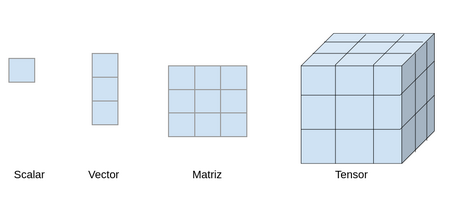
To illustrate what a tensor may represent in real life:
- Scalar (0‑dim tensor): e.g. the intensity value of a pixel in a grayscale image.
- Vector (1‑dim tensor): a line of pixels in a grayscale image.
- Matrix (2‑dim tensor): a full grayscale image.
- 3‑dim tensor: a color image — each pixel has three values (RGB), which can be thought of as three matrices stacked (one per channel).
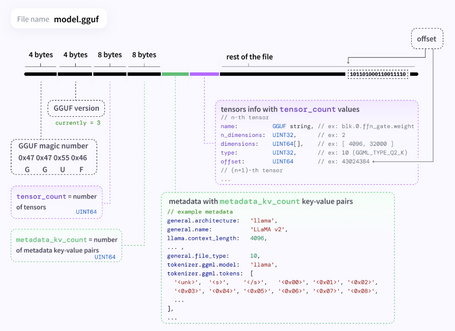
Another file format is GGUF (GPT‑Generated Unified Format), which supports optimized management of LLMs. GGUF can store tensors plus metadata, and supports different types of quantization and fine‑tuning.
GGUF is designed for extensibility and versatility, allowing new information to be added without breaking compatibility with older models, and supporting future‑proof use.
Model parameters
Just as applications have configurable parameters (multi‑currency, multi‑language, etc.), models also expose configurable parameters. Beyond model‑specific parameters, there are common ones critical for optimization:
- temperature: adjusts the probability distribution for the model’s output — i.e. it controls “creativity.” Lower values make outputs more deterministic; higher values produce more random or creative responses. Typical values range from 0 to 1, often defaulting to 0.7 or 0.8.
- top_p: causes the model to choose output tokens from the smallest possible set whose cumulative probability is at least p. Value between 0 and 1.
- top_k: selects the k most likely tokens (according to their probabilities) as possible outputs.
- num_predict: maximum number of tokens the model will generate in one response. A value of “–1” lets it produce tokens until an explicit stop condition.
- stop: a list of strings — if the model generates any of them, generation stops. Useful to force the model to finish at a desired point.
- num_ctx: defines the size of the context window (context‑window) — the total number of tokens the model can process at once. This is one of the most important parameters (see below).
These are among the most relevant parameters, but there are many more. Depending on the interaction mode with Ollama (CLI, API, modelfile) not all may be configurable.
Context length
Context length defines the maximum number of tokens the model can handle at once. This includes:
- User input tokens (prompts).
- Memory or history tokens (previous conversation states, stored dialogues, etc.).
- Output tokens (responses).
- System prompt tokens (instructions to the LLM about how to behave).
Context length is critical, because it directly impacts the quality of the model’s output. In long conversations or when extensive information is provided (e.g. documents), exceeding context limits may lead to erratic or repetitive responses, or loss of ability to reference earlier information.
Although adjustable, LLMs come pre-trained with a maximum context length (e.g. 2048, 4096, 8192, … up to 128K; and some advanced models like Gemini 1.5 Pro claim support for 2 million tokens). Increasing context length beyond model limits can lead to incoherent responses and heavy resource usage (RAM, CPU), potentially causing performance issues.
You can modify this parameter per model through:
- CLI: e.g. for an interactive session using ollama run, you can set it with: /set parameter num_ctx < value >.

- API: by specifying the parameter in the request body using options.
curl http://localhost:11434/api/generate -d '{
  "model": "llama3.2:1b",
  "prompt": "How fast does the Earth rotate?",
  "options": {
    "num_ctx": 1024
   }
}'

- Modelfile: this method will be introduced later on, but you simply need to include the instruction: PARAMETER num_ctx < value > in the Modelfile.
API
In addition to its interactive commands, Ollama provides an API that allows you to interact with LLMs programmatically. This API is especially useful when integrating with other applications (for example, from Spring AI), since you only need to make a call to the corresponding REST endpoint.
By default, the API is exposed on port 11434 (http://localhost:11434 or http://127.0.0.1:11434), although this can be configured. The API exposes the following endpoints:
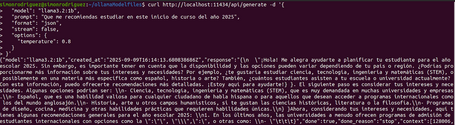
- /api/generate: POST method. Endpoint for obtaining responses from the LLM using a single prompt, without a conversational question–answer sequence. Ideal for tasks like text generation or translation.
- /api/chat: POST method. Endpoint for conversational question–answer interactions.

- /api/embeddings: POST method. Generates embeddings (numeric vector representations) for the input.

- /api/tags: GET method. Equivalent to the interactive command ollama list, showing all models available on the system.

- /api/show: POST method. Equivalent to ollama show, providing details about a specific model such as parameters, templates, licenses, etc.

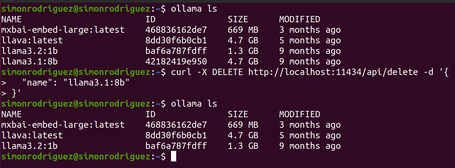
- /api/delete: DELETE method. Equivalent to the ollama rm command for removing a model from the local system.
- /api/pull: POST method. Equivalent to ollama pull, used to download a model from the remote registry to the local system.
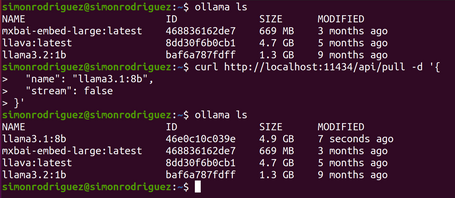
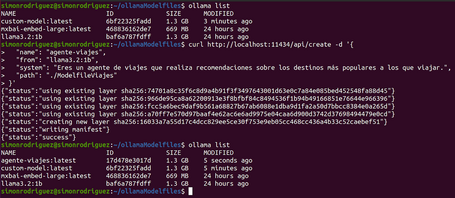
- /api/create: POST method. Equivalent to ollama create, allowing you to create a custom model from a Modelfile.
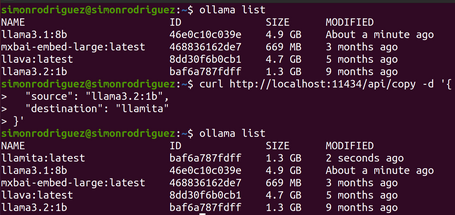
- /api/copy: POST method. Equivalent to ollama cp, used to copy an existing model locally.
- /api/push: POST method. Endpoint for uploading a model to the remote registry.
OpenAI API Compatibility
As widely known, OpenAI is one of the main drivers behind the current wave of LLM-based AI, so many applications rely on its APIs. To keep integrations simple, Ollama provides a compatibility layer that matches the OpenAI API format.
This means that, in addition to the endpoints above, Ollama also exposes others under the /v1/ path (http://localhost:11434/v1/) following the OpenAI API structure. Some of the currently supported compatible endpoints include:
- /v1/chat/completions: equivalent to the /api/chat endpoint.
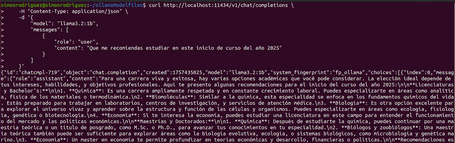
- /v1/embeddings: equivalent to the /api/embeddings endpoint.

- /v1/models: equivalent to the /api/tags endpoint.

With this compatibility layer, many libraries that integrate with OpenAI’s API only need minimal configuration changes to work with Ollama. Some key settings include:
- base_url: set it to Ollama’s v1 endpoint →
http://localhost:11434/v1/ - api_key: any non-empty value works; Ollama does not validate this parameter.
Modelfiles
From its early stages, Ollama was designed with modularity and extensibility in mind (its founders include people who previously worked on Docker). This is why Modelfiles exist: configuration files that act as recipes for defining LLM models in layered form, similar to how Dockerfiles describe container images.
A Modelfile combines the model’s GGUF weights, templates, system prompt, and other instructions.
The information is divided into specific Modelfile instructions, similar in spirit to a Dockerfile. Some of the most important include:
- FROM: required instruction. Specifies the base on which the model is built. Several forms are allowed:
- Existing model: referencing a model already available locally or in the Ollama registry.
- Example:
FROM llama3.2:1b - Safetensors weights: a relative or absolute path to the safetensors files and necessary configuration. Currently supports architectures such as llama, mistral, gemma, or phi3.
- Example: FROM ./models/llama_safetensors/
- GGUF model: a relative or absolute path to a GGUF file.
- Example: FROM ./models/llama-3-2.gguf
- PARAMETER: sets default values for execution parameters.
- Example: PARAMETER temperature 0.3 ; PARAMETER num_ctx 8192
- Some of the most important parameters include:
| Parameter | Description | Type | Example |
|---|---|---|---|
| num_ctx | Defines the size of the context window | int | 4096 |
| temperature | Controls the model’s “creativity” level | float | 0.6 |
| stop | Stop sequences for the LLM cycle. When the model encounters this pattern, it stops and returns. | string | "AI assistant:" |
| top_k | Filters output options to the top k with the highest probabilities | int | 40 |
| top_p | Filters output options based on cumulative probability | float | 0.9 |
- TEMPLATE: instruction used to define the formatting structure of the input prompt for the LLM. This is a very important instruction for chat or instruction‑based models, since the template specifies how system messages, user turns, assistant turns, etc. are delimited to ensure the proper functioning of the question–answer cycle. Templates are written using the Go template syntax. The key variables are:
| Variable | Description |
|---|---|
| {{ .System }} | The system prompt used to configure the model’s behavior. |
| {{ .Prompt }} | The user prompt. |
| {{ .Response }} | The LLM’s response. |
An example of a template instruction could be:
TEMPLATE """{{ if .System }}<|im_start|>system
{{ .System }}<|im_end|>
{{ end }}{{ if .Prompt }}<|im_start|>user
{{ .Prompt }}<|im_end|>
{{ end }}<|im_start|>assistant
"""
- SYSTEM: configures a default system prompt. This allows you to define how the LLM should behave (travel agent, financial agent, maths teacher, etc.). An example would be:
SYSTEM """ You are a travel agent who provides useful information such as laws, prices, important places to visit, places to eat, accommodation and other important tourist information. """
- ADAPTER: using a file path, this instruction allows you to specify a LoRa or QLoRa adapter to be applied on top of the base model indicated in the FROM instruction. It’s important to note that the base model in the FROM instruction must be the same model on which the adapter was originally trained, otherwise the model may behave unpredictably.
- The path can point to:
- A single file in GGUF format: modelo-lora.gguf.
- A folder containing the weights in Safetensor format:
- adaptador-modelo.safetensors, adaptador-config.json.
ADAPTER ./llama3.2-lora.gguf
- LICENCE: specifies the licence under which the model is distributed. For example:
LICENSE """ MIT License """
- MESSAGE: instruction containing sample conversation turns to help the LLM follow a specific style or format. The possible roles are:
- System: an alternative way to define the system prompt.
- User: examples of user questions.
- Assistant: examples of how the model should respond.
An example of message instructions could be:
MESSAGE user Is Madrid in Spain?
MESSAGE assistant yes
MESSAGE user Is Paris in Spain?
MESSAGE assistant no
MESSAGE user Is Barcelona in Spain?
MESSAGE assistant yes
It’s important to note that the Modelfile is not case sensitive — instructions are written in uppercase purely for clarity. Additionally, the instructions do not need to follow a strict order (although placing the FROM instruction first is recommended for readability).
Considering the points described above, a simple example of a Modelfile could be:
FROM llama3.2:1b
PARAMETER temperature 0.3
PARAMETER num_ctx 8192
SYSTEM You are a travel agent who provides useful information such as laws, prices, important places to visit, food spots, accommodations, and other key tourist details.
After saving this file, the following command would be executed to create it:
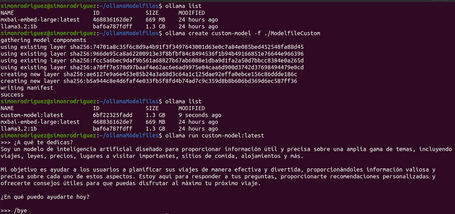
ollama create custom-model -f ./ModelfileCustom
Once created, you can verify that it is now listed alongside the other models, and you can start interacting with it:
Importing External Models
Ollama supports the execution of models external to its own hub, as long as they are distributed in standard formats such as GGUF or Safetensors, or with adapters for fine-tuning. Here are some examples of the process:
GGUF
- Download the file in
.ggufformat. You can find an example at this link. - Generate the Modelfile referencing the downloaded file.
FROM ./external-models/gguf/llama-3.2-1b-instruct-q4_k_m.gguf
PARAMETER num_ctx 4096
SYSTEM "You are a chatbot that only tells jokes."
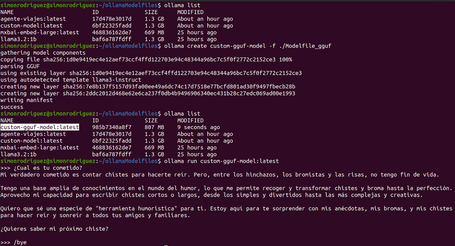
- Create the model so that it can be executed later:
ollama create custom-gguf-model -f ./Modelfile_gguf
Safetensors
- Download the required files into the same folder. You can find an example at this link.
- Generate the Modelfile with a reference to the path where the files are located.
FROM ./external-models/safetensors/llama3_2_instruct_st/
PARAMETER num_ctx 4096
PARAMETER temperature 0.7
- Create the model so that it can be executed later:
ollama create custom-st-model -f ./modelfile
Adapters
- Download the required files into the same folder. You can find an example at this link.
- Generate the Modelfile referencing the path where the files are located.
FROM llama-3.2-3b-instruct-bnb-4bit
ADAPTER ./adapters/llama3_2_lora/llama3.2_LoRA_Spanish.gguf
PARAMETER temperature 0.5
SYSTEM "You now respond in the style taught by the LoRA."
- Create the model so that it can be executed later:
ollama create custom-lora-model -f ./modelfile
Quantization with Ollama
Ollama also includes the option to quantize a model (i.e., reduce the numerical precision of its weights) at the moment of its creation. This is done by specifying the -q (or --quantize) parameter in the create command, as follows:
ollama create llama-quantized -f ./Modelfile -q q4_K_M
Based on the following Modelfile, you can check the quantisation result (you can see how the resulting model is smaller in size):
FROM llama3.2:1b-instruct-fp16
PARAMETER temperature 0.9
SYSTEM """ You are a travel agent called Mr Travel."""
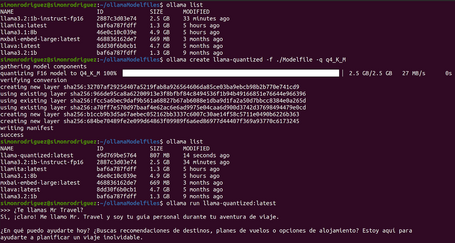
Under the hood, the quantization instructions from the llama.cpp library are used to carry out this process, saving the model with the appropriate name. Some of the possible quantization options include: q4_0, q5_0, q6_K, q8_0, q4_K_S, q4_K_M, etc.
Conclusions
This post explored more advanced interaction options with Ollama. We tested how the Ollama API works, as well as important parameters and configurations to ensure optimal model performance.
We also tested one of Ollama’s most powerful features: the ability to customize models so they better fit specific use cases and provide a better user experience in AI-powered applications.
In the next post, we’ll introduce other tools for running LLMs locally.
References

Simón Rodríguez
Passionate about science and technology, to which I dedicate a large part of my life, both professionally and personally. Closely connected to backend software development, cloud, and DevOps, but always open to exploring any other existing or future technological fields. Continuously learning about everything around me—technology, people, nature—in order to contribute my small part to this world.
View more of Simón.More thoughts about this.
Read more.
What is TOGAF and why is it useful?

Microservices Architecture Patterns: Security.

Business Driven: The Pending Revolution in IT.

Using the Stubs Generated with Spring Cloud Contract in Docker.

Comments are moderated and will only be visible if they add to the discussion in a constructive way. If you disagree with a point, please, be polite.

Tell us what you think.