

Thinking about an AI agent naturally brings to mind intelligent systems and automation. But have you ever considered what happens behind the scenes at the infrastructure and concurrency level?
With the Model Context Protocol (MCP), LLMs can connect to our databases, APIs, and internal tools. However, every external call introduces latency—and more latency. If we add Java Virtual Threads to the equation, AI agent orchestration suddenly has an efficient way to avoid overwhelming our servers.
In this post, we'll explore MCP integration in Java with Spring AI, move on to Virtual Threads, and see how they become a lifesaver when thousands of AI agents are running concurrently. Welcome to the world of scalable AI with Java.
Why use Virtual Threads with MCP?
Why high concurrency is essential for AI
We first need to understand what happens when an LLM uses a tool through MCP. The heavy CPU computation is delegated to the language model itself, but what remains is fundamentally an I/O-bound problem. An AI agent spends 99% of its time waiting: waiting for the LLM to decide which tool to call, waiting for the network, or waiting for the MCP server to return data.
Now imagine this scaled to thousands of concurrent users running on traditional thread pools. The outcome is easy to predict: the server runs out of memory before the LLM has even generated its first token. If you truly intend to deploy AI agents in production, that's when it's time to switch to Virtual Threads.
Why this combination?
The Model Context Protocol (MCP) is the new open standard for connecting AI clients with external tools and data servers. Combining Spring AI's MCP support with a JVM running Virtual Threads provides several compelling advantages:
- Blocking without the cost: Virtual Threads (available since Java 21) are ultra-lightweight threads managed by the JVM, as explained in this article by our colleague Daniel Peña. Whenever an agent performs a blocking HTTP or gRPC request to an MCP server, the JVM unmounts the virtual thread and releases the underlying platform thread so it can continue serving other requests.
- Clean imperative programming: Forget about chaining complex reactive pipelines with frameworks like WebFlux just to deal with asynchronous AI APIs. You can write straightforward sequential code that's easy to debug and maintain.
- Massive scalability: Move from supporting a handful of simultaneous agents to thousands on the same machine, dramatically reducing cloud infrastructure costs.
Core concepts: Host, Server, and Virtual Threads
The combination of MCP and modern Java revolves around three core components:
- MCP Host (client): In our case, a Spring Boot/Spring AI application. Think of it as the team's playmaker—it communicates with the LLM and orchestrates every tool invocation.
- MCP Server: An independent microservice or process exposing the actual tools (database connectors, system utilities, APIs, etc.).
- Virtual Threads: Java's execution engine that allows every AI agent session to run in its own dedicated thread without performance penalties.
Now that we understand these building blocks, how do we configure the entire ecosystem? Let's walk through a practical example.
Preparing a Java project for AI and MCP
Once we've decided to build highly concurrent AI agents, we'll configure our environment step by step using Spring Boot and Spring AI.
First, create your project (if you haven't already) using, for example, Spring Initializr, making sure you're using Java 21 or later.
In your build.gradle (or pom.xml if you're using Maven), add the required Spring AI and MCP dependencies:
plugins {
    id 'java'
    id 'org.springframework.boot' version '4.0.6'
    id 'io.spring.dependency-management' version '1.1.7'
}

group = 'com.example'
version = '0.0.1-SNAPSHOT'

java {
    toolchain {
        languageVersion = JavaLanguageVersion.of(21)
    }
}

repositories {
    mavenCentral()
    maven { url 'https://repo.spring.io/milestone' }
}

ext {
    set('springAiVersion', "2.0.0-M4")
}

dependencies {
    implementation 'org.springframework.ai:spring-ai-starter-mcp-client'

    implementation 'org.springframework.ai:spring-ai-starter-model-ollama'

    implementation 'org.springframework.boot:spring-boot-starter-web'
    testImplementation 'org.springframework.boot:spring-boot-starter-test'
    testRuntimeOnly 'org.junit.platform:junit-platform-launcher'
}

dependencyManagement {
    imports {
        mavenBom "org.springframework.ai:spring-ai-bom:${springAiVersion}"
    }
}

tasks.named('test') {
    useJUnitPlatform()
}
To unlock the concurrency benefits we've been discussing, add the following line to your application.properties file so Spring Boot delegates blocking operations to Virtual Threads:
spring.threads.virtual.enabled=true
Once configured, let's build a very simple AI service. This component acts as our MCP Host, connecting to a local MCP server (for example, a Node.js or Python process exposing corporate information) and handling user requests:
package com.example.ai.mcp;

import org.springframework.ai.chat.client.ChatClient;
import org.springframework.ai.tool.ToolCallback;
import org.springframework.stereotype.Service;
import java.util.List;

@Service
public class AgentService {

    private final ChatClient chatClient;

    // Spring AI automatically configures the MCP client and exposes its tools as ToolCallback beans.
    public AgentService(ChatClient.Builder chatClientBuilder, List<ToolCallback> mcpTools) {
        this.chatClient = chatClientBuilder
                .defaultTools((Object) mcpTools.toArray(new ToolCallback[0])) // Bind the MCP server tools
                .build();
    }

    public String askAgent(final String userPrompt) {
        return this.chatClient.prompt()
                .user(userPrompt)
                .call()
                .content();
    }
}
In this implementation, the ChatClient dynamically discovers the available tools exposed by the MCP server. When askAgent() is invoked, the LLM evaluates the user's prompt and, whenever it requires external data, transparently calls the appropriate MCP tool through a blocking network request.
Because Virtual Threads are enabled, the underlying platform thread is immediately released while waiting for the network response, allowing the JVM to continue processing other AI interactions.
The "Matryoshka Effect" of blocking in AI agents
In a traditional web application, such as an API querying a database, a thread handles the HTTP request, blocks while reading from the database, receives the data, and returns a response. There is only a single I/O wait.
With an AI agent communicating through an external MCP server, what I like to call the Matryoshka blocking effect appears—a blocking operation nested inside another blocking operation.
When we invoke askAgent(), this is what happens inside a single thread:
- First blocking operation (sending the prompt to the LLM): Spring AI sends the user's prompt to the language model and waits for the network response.
- The LLM makes a decision: the model analyzes the request and concludes: "I don't have that information—I need to call the getInvoice tool." And no, don't look for that method in the code above—that's the beauty of MCP. The protocol exposes the available tools, and the model decides which one it needs.
- Second blocking operation (calling the MCP server): Spring AI intercepts the model's decision and sends a network request to the external MCP server hosting the corporate tool. The thread blocks again while waiting for the MCP response.
- Third blocking operation (returning to the LLM): the MCP server replies, Spring AI forwards the resulting JSON back to the language model, and the thread blocks one final time while the LLM generates the final answer.
If we used traditional platform threads (java.lang.Thread backed by operating system threads), a single user interacting with the AI agent would monopolize a physical thread for several seconds across multiple nested network operations.
With Virtual Threads, the JVM performs its magic. Every time one of these three network waits begins, the virtual thread immediately releases its underlying Carrier Thread. That platform thread instantly starts serving other requests, while the virtual thread is resumed later—possibly on a completely different platform thread—as soon as the network data becomes available.
"I believe it, but I want to see it": inspecting Virtual Threads in the logs
Nothing beats a real demonstration. Let's modify the service we created earlier so it prints the current thread before invoking the ChatClient, allowing us to visualize concurrency:
 package com.example.ai.mcp;
import org.springframework.ai.chat.client.ChatClient;
import org.springframework.ai.mcp.SyncMcpToolCallbackProvider;
import org.springframework.beans.factory.ObjectProvider;
import org.springframework.stereotype.Service;

@Service
public class AgentService {

    private final ChatClient chatClient;

    // ObjectProvider keeps the MCP client optional so local startup doesn't fail.
    public AgentService(ChatClient.Builder chatClientBuilder, ObjectProvider<SyncMcpToolCallbackProvider> mcpToolCallbackProvider) {

        mcpToolCallbackProvider.ifAvailable(provider -> chatClientBuilder.defaultToolCallbacks(provider.getToolCallbacks()));

        this.chatClient = chatClientBuilder.build();
    }

    public String askAgent(final String userPrompt) {
        System.out.println("THREAD DEBUG -> " + Thread.currentThread());

        return this.chatClient.prompt()
                .user(userPrompt)
                .call()
                .content();
    }
}
After starting our Spring Boot 4 application and sending a few requests, the console produces something like this:
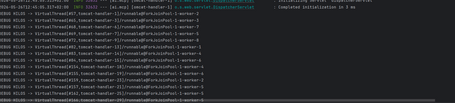
How should we interpret this output?
- VirtualThread[#57...] confirms that the request is no longer running on a Tomcat thread but inside its own independent Virtual Thread.
- ForkJoinPool-1-worker-2 represents the actual operating system thread (Carrier Thread) currently executing that virtual thread.
If Spring AI's MCP client tracing were enabled, we'd observe that during the tool invocation the VirtualThread[#57] pauses, immediately releasing worker-1, allowing another request (such as VirtualThread[#65]) to use the CPU without delay.
Simulating high-concurrency workloads
To truly appreciate the scalability, we can expose the service through a simple REST controller. Under heavy incoming traffic, we'll see the system continue responding smoothly without exhausting the connection pool.
package com.example.ai.mcp;

import org.springframework.web.bind.annotation.PostMapping;
import org.springframework.web.bind.annotation.RequestBody;
import org.springframework.web.bind.annotation.RequestMapping;
import org.springframework.web.bind.annotation.RestController;

@RestController
@RequestMapping("/api/v1/agent")
public class AgentController {

    private final AgentService agentService;

    public AgentController(AgentService agentService) {
        this.agentService = agentService;
    }

    @PostMapping("/ask")
    public String ask(@RequestBody String prompt) {
        // Spring Boot automatically maps this request to a Virtual Thread.
        return agentService.askAgent(prompt);
    }
}
Suppose we simulate 500 users simultaneously querying the AI agent, where each request requires the LLM to call tools taking 1.5 seconds to respond.
A traditional server configured with a pool of 200 platform threads would quickly run out of execution capacity.
With Virtual Threads, however, the JVM creates 500 lightweight virtual threads. They start instantly, wait for MCP I/O without consuming platform threads, and terminate cleanly after producing their responses.
Everything stays responsive. Everything just works.
Common pitfalls—and how to avoid them
- Confusing CPU speed with concurrency
Virtual Threads do not make local AI algorithms or JSON parsing faster. Their real power lies in eliminating the cost of waiting for I/O. If your workload involves heavy local numerical computation, traditional threads or dedicated thread pools remain the appropriate solution.
- Ignoring external system limits
Just because your application can support thousands of concurrent connections doesn't mean your database or remote MCP server can handle 10,000 simultaneous requests. Always configure sensible timeouts and properly size your HTTP and gRPC connection pools.
- Failing to monitor the JVM
When AI workloads spawn thousands of Virtual Threads, monitoring becomes essential. Tools such as JDK Flight Recorder (JFR) help identify scheduler bottlenecks and unexpected blocking behavior.
Conclusion
We now have the essential building blocks for developing the next generation of enterprise AI architectures using today's most advanced standards.
Combining MCP's flexibility for decoupling business tools with the robustness and efficiency of Java Virtual Threads allows us to finally dispel the myth that Java is too heavy or too slow for modern AI ecosystems. (Long live Java!)
If you're coming from traditional web development, the mindset shift required to design autonomous, network-connected AI agents is substantial. The key is to experiment, measure infrastructure behavior under load, and continuously refine your tool orchestration flows.
Building production-ready, massively scalable AI agents is no longer an unattainable goal. And with the pace at which this ecosystem is evolving, the future looks even more promising.
References
- Model Context Protocol (MCP) Official Documentation by Anthropic
- Spring AI Project Official Reference and MCP Integration Guide
- JEP 444: Virtual Threads Specification - OpenJDK
- Spring Boot Reference Guide: Production-ready Features & Virtual Threads
- Anthropic MCP GitHub Repository and Ecosystem Tools

Sergio Torres
Software Engineer from UMA, passionate about project management and development in any technological field. Aspiring writer in my spare time. A project without humor is just work. Living in the city with the best weather in the world, where I take care of Backend development during my not-so-free time.
View more of Sergio.More thoughts about this.
Read more.
Extreme Cache Performance with Caffeine.

The Concurrency Challenge.

Resilience4j: Designing Fault-Resilient Java Microservices.

Powerful, clean, and modern code with Java 24 (Java 25’s younger sibling).
Comments are moderated and will only be visible if they add to the discussion in a constructive way. If you disagree with a point, please, be polite.

Tell us what you think.