

Nowadays, it seems that everything comes with artificial intelligence: your phone has AI, your car has AI… and if we believe some ads, even your hair dryer “learns from you” to style your bangs better.
The word AI has become a catch-all term. It’s used to describe both deep learning models and simple rule-based systems with a couple of if statements. And amid all that noise, it’s becoming increasingly difficult to answer a simple but important question: what does it really mean to use AI in engineering systems?
In the world of infrastructure, CI/CD, and platform operations, AI usually has nothing to do with giant neural networks or “thinking” models. Here, it shows up in a much more humble — and, interestingly, much more useful — way: as a tool to detect anomalous behavior and make automated decisions.
This article is not about grand promises or dashboards full of futuristic charts. It’s about a very concrete problem: how to detect anomalies in pipelines that, at first glance, seem to work perfectly.
A practical case: detecting pipelines that get “stuck thinking”
The use case we built is quite down-to-earth: detecting pipelines that take too long to do things that should, in theory, be fast. No science fiction. No future-predicting models. Just identifying those moments when a pipeline lingers longer than usual… and we pretend it’s normal.
Instead of manually deciding what counts as “too long” using the classic number pulled out of thin air, we let the system observe how pipelines usually behave. If the normal execution time is a few seconds and, suddenly, one decides to take several minutes (to reflect on the meaning of life, perhaps), the system raises its hand.
Not because it crossed some magical threshold, but because it doesn’t fit the usual pattern.
The result is a pipeline that monitors itself. When it behaves as expected, it passes without issue. When it starts getting creative with waiting times, it automatically fails. No debates, no ignored dashboards, and no humans deciding whether “this time we’ll let it slide.”
In the end, it’s not about making pipelines smarter — it’s about making them a bit less naive. And above all, about letting the data decide when something stops being normal.
What tools did we use to achieve this?
To make this solution work, we need a set of tools that complete the loop of pipeline execution, anomaly detection, and model training for automation.
Argo Workflows: pipeline execution and control
Argo Workflows is the execution engine. This is where the real pipelines live: in this case, workflows that simulate jobs with variable durations and, once finished, execute an automatic validation step.
A key design point is the use of onExit, which allows:
- The workflow to execute its main logic.
- Once finished, an AIOps evaluation step to run.
- If that step fails, the entire workflow is marked as failed.
This ensures that anomaly detection becomes part of the pipeline lifecycle, not an external observer system.
One way to apply this is to build a workflow that simulates a pipeline. The pipeline configuration includes a one-second sleep, but we add a “variable” (for lack of a better explanation) so that, occasionally, the sleep lasts 300 seconds.
Prometheus: the source of truth for behavior
Prometheus acts as the historical data source. It doesn’t make decisions, but it collects key metrics such as workflow duration and exposes them consistently.
It allows us to:
- Build the model’s training dataset.
- Understand how the system behaves under normal conditions.
- Separate real signals from noise.
An important point is that Prometheus is not used as an ML engine, but as a time-series database.
Exporting metrics from Prometheus to learn
We built a custom exporter because we needed a simple and reliable metric representing the total duration of each workflow. Argo Workflows does not expose this directly, and for an AIOps system, duration is a key behavioral signal.
The exporter simply queries the workflow state, calculates its execution time, and exposes it as a Prometheus metric. It doesn’t make decisions or apply logic — it just converts internal platform state into reusable observability data.
This way, we keep responsibilities clearly separated: the exporter generates data, Prometheus stores it, and the AI layer decides how to interpret it.
from kubernetes import client, config
from prometheus_client import Gauge, start_http_server
from kubernetes.config.config_exception import ConfigException
from datetime import datetime
import time

print("Exporter starting...", flush=True)

try:
   config.load_incluster_config()
   print("Using in-cluster config", flush=True)
except ConfigException:
   config.load_kube_config()
   print("Using local kubeconfig", flush=True)

api = client.CustomObjectsApi()

DURATION = Gauge(
   "argo_pipeline_duration_seconds",
   "Workflow duration",
   ["workflow"]
)

def parse(ts):
   return datetime.fromisoformat(ts.replace("Z", "+00:00"))

start_http_server(8000)
print("Metrics server listening on :8000", flush=True)

while True:
   wfs = api.list_namespaced_custom_object(
       group="argoproj.io",
       version="v1alpha1",
       namespace="argo",
       plural="workflows"
   )

   count = 0
   for wf in wfs["items"]:
       status = wf.get("status", {})
       if status.get("phase") == "Succeeded":
           start = parse(status["startedAt"])
           end = parse(status["finishedAt"])
           duration = (end - start).total_seconds()
           DURATION.labels(
               workflow=wf["metadata"]["name"]
           ).set(duration)
           count += 1

   print(f"Updated {count} workflows", flush=True)
   time.sleep(30)
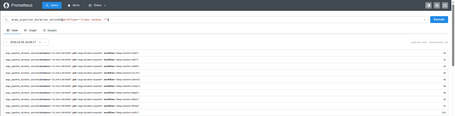
With the query argo_pipeline_duration_seconds{workflow=~"sleep-random-.*"} we can view the exported data in Prometheus.
The trainer: how we teach the system what “normal” looks like
We implemented a simple and explicit trainer whose sole purpose is to learn what “normal” workflow duration looks like based on real historical data.
The process is straightforward:
- We load a dataset with historical durations.
- We validate that there is enough data for training.
- We compute basic statistics to gain visibility into system behavior.
- We train an anomaly detection model (Isolation Forest).
- We store the trained model in a persistent volume.
Training runs as a Kubernetes Job/CronJob, allowing us to refresh the model periodically without impacting pipeline execution. There’s no complex logic or heavy dependencies: the value lies in learning the system’s real distribution, not in algorithmic sophistication.
This way, the definition of “normal” evolves over time and automatically adapts to environmental changes.
import pandas as pd
from sklearn.ensemble import IsolationForest
import joblib
import os
import time

def log(msg):
   print(f"[TRAINER] {msg}", flush=True)

DATASET_PATH = "/data/dataset.csv"
MODEL_PATH = "/models/sleep-random.pkl"
MIN_SAMPLES = 20

log("Starting model training")

if not os.path.exists(DATASET_PATH):
   log("Dataset not found, aborting training")
   exit(1)

df = pd.read_csv(DATASET_PATH)

log(f"Loaded dataset with {len(df)} samples")

if len(df) < MIN_SAMPLES:
   log(f"Not enough samples (<{MIN_SAMPLES}), skipping training")
   exit(0)

min_d = df["duration"].min()
max_d = df["duration"].max()
mean_d = df["duration"].mean()

log(f"Duration stats → min={min_d:.2f}s max={max_d:.2f}s mean={mean_d:.2f}s")

X = df[["duration"]]

log("Training IsolationForest model")

model = IsolationForest(
   contamination=0.02,
   random_state=42
)

start = time.time()
model.fit(X)
elapsed = time.time() - start

log(f"Model trained in {elapsed:.2f}s")

# 4️⃣ model saved
joblib.dump(model, MODEL_PATH)
log(f"Model saved to {MODEL_PATH}")

ts = int(time.time())
versioned_path = f"/models/sleep-random-{ts}.pkl"
joblib.dump(model, versioned_path)
log(f"Versioned model saved to {versioned_path}")

log("Training job completed successfully")
The test workflow: putting the system to work
To validate the entire architecture, we created a simple but intentionally variable Argo Workflows workflow. Its purpose is not to perform real work, but to generate executions with different behaviors so we can verify that the AIOps system works as expected.
The workflow runs a single step that sleeps for a random amount of time:
- Most of the time it simulates a fast execution.
- Occasionally, it forces an abnormally slow execution.
This way, we introduce controlled noise and create a clear signal that the system can learn from.
The key part lies in the onExit section. When the workflow finishes, an additional step is executed that:
- Loads the trained machine learning model.
- Evaluates the total workflow duration.
- Decides whether the execution is normal or anomalous.
If the model detects an anomaly, the workflow automatically fails. Otherwise, it is considered valid.
This turns anomaly detection into part of the pipeline itself, rather than an external, after-the-fact analysis.
This workflow acts as a test bench to run the system multiple times, observe how the model evolves, and verify that automatic detection works consistently under real conditions.
apiVersion: argoproj.io/v1alpha1
kind: Workflow
metadata:
 generateName: sleep-random-
 namespace: argo
spec:
 serviceAccountName: mmartin
 entrypoint: main
 onExit: aiops-check

 templates:
   - name: main
     steps:
       - - name: random-sleep
           template: sleep

   - name: sleep
     container:
       image: alpine:3.19
       command: [sh, -c]
       args:
         - |
           R=$((RANDOM % 5))
           if [ "$R" -eq 0 ]; then
             SLEEP_TIME=300
             echo "🔥 ANOMALOUS RUN: sleeping ${SLEEP_TIME}s"
           else
             SLEEP_TIME=1
             echo "Normal run: sleeping ${SLEEP_TIME}s"
           fi

           sleep ${SLEEP_TIME}

   - name: aiops-check
     container:
       image: quitos90/argo-aiops-ml-check:0.1
       imagePullPolicy: Always
       command: ["python", "-u", "/app/aiops-check-ml.py"]
       env:
         - name: STEP_DURATION
           value: "{{workflow.duration}}"
       volumeMounts:
         - name: models
           mountPath: /models

 volumes:
   - name: models
     persistentVolumeClaim:
       claimName: aiops-models
We ran the job a few times and…
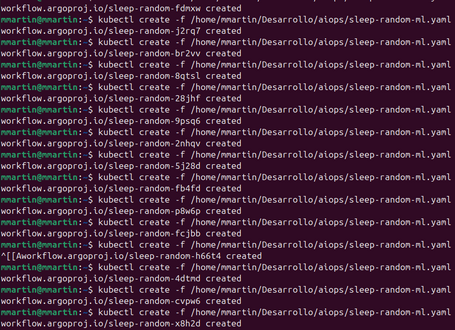
Voilà! We can see the results in Argo Workflows.
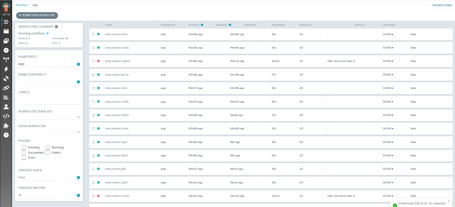
If we look at the two executions that failed, they are the ones that lasted more than 5 minutes and, upon closer inspection, we can see that they are the ones we deliberately forced to behave as anomalies.
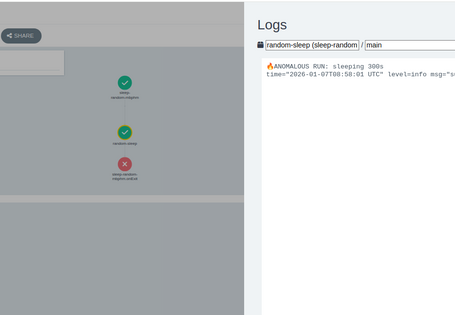
With this, even though the pipeline appears to have finished successfully at first glance (since its main task did not fail), we can clearly see that something unusual is happening. In this case, it takes 5 minutes when most pipelines complete in approximately 40 seconds.
Why not simply use a timeout?
The most common way to control slow pipelines is to add a fixed timeout. It’s simple, easy to understand, and works… until it doesn’t. The AIOps-based approach we followed addresses limitations that timeouts simply cannot solve.
A timeout is static
A timeout defines a rigid limit: if the pipeline takes longer, it fails. This forces you to choose an arbitrary value that is almost never perfect:
- Too low → false positives.
- Too high → real issues go unnoticed.
Our approach, instead, learns what normal system behavior looks like and adapts over time.
Conclusions
After walking through the entire process, the main conclusion is clear: the difficulty of applying AIOps lies not in the model itself, but in training it properly. The algorithm we used is simple, but its behavior depends entirely on the quality and representativeness of the data it learns from.
For this type of system to work, it is essential to have good observability and sufficient historical data. Without reliable metrics and temporal context, any attempt at “intelligence” quickly degrades into arbitrary rules or constant false positives. AI does not fix a lack of visibility; it simply amplifies what already exists.
This exercise leaves us with an important lesson: before thinking about more complex models or more sophisticated architectures, it is crucial to invest in understanding the real behavior of the system. In AIOps, intelligence begins long before training and is often much closer to observability than to machine learning.

Marcos Martín
DevOps / Platform Engineer with over 15 years of experience trying to make deployments boring — because that means everything is working smoothly. Passionate about automation, well-structured logs, and pipelines that run on the first try. Always looking for the perfect balance between technology, simplicity, and a good cup of coffee.
View more of Marcos.More thoughts about this.
Read more.
Platform as a Product: Scaling DevOps with IDPs.

Improving test quality with mutation testing.

Regulations and Standards in QA: From Obligation to Innovation.

QA in IoT: How to Ensure Reliability in a Connected World.

Comments are moderated and will only be visible if they add to the discussion in a constructive way. If you disagree with a point, please, be polite.

Tell us what you think.